
Web Design & Technical SEO explore our digital marketing FAQs
B2B traffic behaves differently. Smart Insights reports that only 15–16% of B2B organic visits come from mobile devices, and ContentSquare data shows 83% of B2B e-commerce traffic still originates from desktop. During work hours (9 AM to 5 PM), desktop accounts for 64% of B2B site visits. This creates a dangerous assumption: that mobile doesn't matter for B2B.
Responsive Web Design in 2026: The Complete B2B SaaS Playbook
Your website must perform flawlessly across devices, satisfy tightening search engine requirements, and remain visible in an AI-dominated search landscape. Here's how.
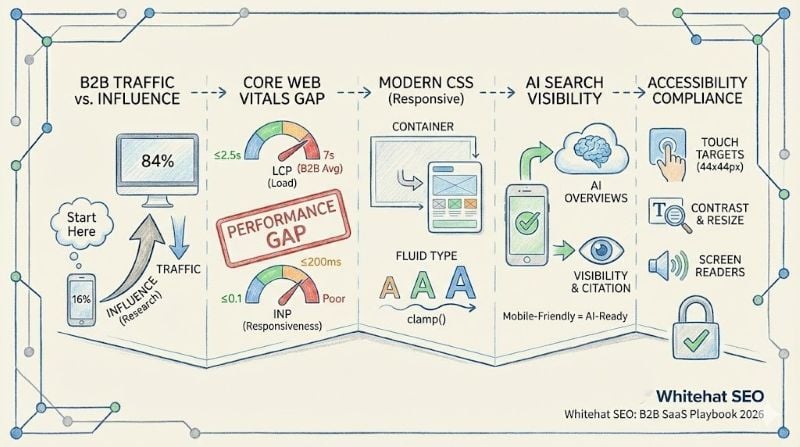
Responsive web design is no longer a best practice—it's the baseline that determines whether your B2B SaaS site ranks, converts, or even gets indexed. Google now exclusively crawls mobile versions of websites, AI Overviews are cutting organic click-through rates by up to 58%, and the average B2B site's mobile performance falls nearly 3x below Google's Core Web Vitals thresholds. At Whitehat SEO, we've compiled this comprehensive playbook synthesising the latest data across mobile traffic patterns, technical standards, AI search, HubSpot CMS capabilities, and accessibility to provide an actionable framework for marketing directors at B2B SaaS companies.
UK Mobile Traffic: The Nuanced B2B Story
The headline numbers can mislead. Globally, mobile devices generate 62–64% of all web traffic, and the UK tracks slightly lower at roughly 49% mobile and 47% desktop according to StatCounter's November 2025 data. Ofcom's 2025 research shows UK mobile data consumption surging 15.3% year-on-year, with 5G coverage reaching 85% of English premises.
Key Insight
BCG and Google's landmark research found that 80% of B2B buyers use mobile devices at work and 50% of B2B search queries now come from smartphones. Mobile drives or influences 42% of revenue in B2B organisations. A site that fails on mobile doesn't just lose mobile conversions—it loses the initial research moments that seed the entire purchase journey.
The disconnect between low mobile traffic share and high mobile influence exists because B2B buyers often start research on mobile—during commutes, between meetings, on evenings—then shift to desktop for deeper evaluation and conversion. This cross-device journey spans an average of 62+ touchpoints across 10+ interaction channels over a buying cycle that 6Sense now measures at 10.1 months.
Mobile commerce in the UK is projected to surpass £100 billion by 2025, with smartphones driving 70% of online transactions. Yet mobile cart abandonment sits at approximately 77%, and desktop still converts at roughly double the rate of mobile (4.8% vs 2.9% across industries). For B2B SaaS specifically, mobile conversion rates average 25–35% lower than desktop unless specifically optimised. Closing this gap represents one of the largest untapped revenue opportunities, which is why mobile website optimisation should be a priority for every B2B marketing team.
Core Web Vitals: Stable Thresholds, Intensifying Enforcement
Google's Core Web Vitals thresholds have not changed since their introduction, despite some SEO blogs claiming otherwise. The three metrics and their "good" thresholds remain:
| Metric | "Good" Threshold | What It Measures |
|---|---|---|
| Largest Contentful Paint (LCP) | ≤ 2.5 seconds | Loading performance |
| Interaction to Next Paint (INP) | ≤ 200 milliseconds | Responsiveness |
| Cumulative Layout Shift (CLS) | ≤ 0.1 | Visual stability |
INP officially replaced First Input Delay (FID) in March 2024. Unlike FID, which only measured the delay of the first interaction, INP captures the full lifecycle of the worst interaction on a page—including input delay, processing time, and presentation delay. This is a higher bar, particularly for JavaScript-heavy B2B SaaS sites with complex forms, dashboards, and interactive elements.
What has changed is enforcement intensity. Google's December 2025 core update—described as one of the most significant in recent memory—increased the weighting of technical performance alongside content quality. Pages with LCP above 3 seconds experienced 23% more traffic loss than faster competitors with similar content. Sites failing CWV overall saw 20–30% more severe traffic losses during this update.
7.05s
Average B2B mobile LCP
48%
Mobile sites achieving good CWV
3x
Higher conversion: 1s vs 5s load
The performance gap in B2B is alarming. The average mobile LCP for B2B companies is 7.05 seconds—nearly three times Google's threshold. Only 48% of mobile websites globally achieve good CWV scores. Every second of delay carries measurable cost: a B2B site loading in 1 second converts 3x higher than one loading in 5 seconds, and a 100ms improvement can boost conversions by up to 7%.
For a deeper dive into website performance optimisation, read our comprehensive technical guide.
Modern CSS Has Transformed Responsive Implementation
The CSS landscape for responsive design has evolved dramatically. Container queries—which allow components to adapt based on their parent container's size rather than the viewport—now enjoy 93.77% global browser support and have been used by 41% of developers according to the State of CSS 2025 survey.
This is the single biggest architectural shift in responsive design since media queries. Container queries enable truly reusable components that adapt intelligently regardless of where they appear in a layout, eliminating the need to write viewport-specific overrides for every context.
The Practical Guideline
Use media queries for macro layout (page-level column changes, sidebar visibility) and container queries for micro layout (cards, navigation elements, widgets, data tables). Container queries don't replace media queries—they complement them.
Other CSS features that have reached production-ready status include CSS :has() (used by 80.4% of developers, the most-used new feature in the State of CSS 2025 survey), CSS nesting (eliminating the primary reason for Sass in many projects), CSS subgrid (solving cross-component alignment), and cascade layers (@layer) with 95% browser support for managing specificity in design systems.
Fluid Typography Best Practices
Fluid typography using CSS clamp() has become the standard approach, with approximately 94.5% global browser support. The recommended pattern combines rem and viewport units:
font-size: clamp(1rem, 0.5vw + 0.8rem, 1.25rem);Never use viewport units alone—this breaks WCAG zoom requirements. Body text should range from 16px minimum to 20–24px maximum, with H1 headings scaling from 2rem to 3.2–4rem. Tools like Utopia (utopia.fyi) generate complete fluid type scales.
Thumb-Zone Awareness for Mobile
Physical design for mobile demands thumb-zone awareness. On screens over 6.5 inches (now the mainstream at 6.1–6.7 inch average), users can comfortably reach only 36% of the screen with their thumb, compared to 75% on smaller phones. Place primary CTAs and navigation in the bottom third of the screen. Use sticky footer navigation for critical actions. Minimum touch targets should be 44×44 CSS pixels (WCAG AAA recommendation) with at least 8px spacing.
AI Search and the Mobile Optimisation Connection
The rise of AI answer engines—ChatGPT, Google's AI Overviews, Perplexity, and Claude—represents the most significant shift in search behaviour since mobile. What many marketing directors miss is that mobile performance directly impacts AI visibility.
AI systems like Google's AI Overviews prioritise well-structured, fast-loading content. Sites that perform poorly on mobile are less likely to be cited in AI-generated answers. The same factors that improve mobile experience—clear structure, fast performance, accessible content—also improve AI visibility.
The AI Search Impact on CTR
Zero-click searches now account for 69% of all searches, and AI Overviews are cutting organic CTR by up to 58%. B2B SaaS sites must optimise for being cited by AI engines rather than just ranking organically.
This means visible, well-structured content with comprehensive schema markup and extractable answer snippets. At Whitehat, we call this Answer Engine Optimisation (AEO)—the practice of structuring content so AI systems can easily extract and cite your information.
Cross-device attribution remains a critical challenge. B2B buyers use an average of 10 interaction channels, and the typical pattern—mobile research → desktop evaluation → mobile re-engagement → desktop conversion—makes single-device attribution models inadequate.
Privacy changes (third-party cookie deprecation, iOS tracking restrictions) have further complicated tracking. Deterministic matching covers only about 30% of traffic. Server-side tracking is becoming essential, and marketing directors should invest in cross-device attribution platforms that use hybrid probabilistic-deterministic matching. For HubSpot users, this is where proper HubSpot onboarding with attribution tracking becomes invaluable.
Responsive Images, Performance, and Next-Gen Formats
Image optimisation directly impacts the largest CWV metric: 85.3% of desktop LCP elements and 76% of mobile LCP elements are images. The recommended approach is progressive enhancement using the <picture> element.
Image Format Recommendations
| Format | Size Reduction | Browser Support | Priority |
|---|---|---|---|
| AVIF | 50% smaller than JPEG | 94.67% | Serve first |
| WebP | 25–34% smaller than JPEG | 95.29% | Fallback |
| JPEG | Baseline | 100% | Safety net |
Despite near-universal browser support, AVIF adoption remains low—only 0.7% of pages use it for LCP images, representing a significant competitive opportunity.
Critical Performance Rules
- Never lazy-load the LCP image (16% of sites still make this mistake)
- Use
fetchpriority="high"on the hero image - Always include width and height attributes to prevent CLS
- Generate responsive variants at minimum 480, 768, 1280, and 1600px widths using srcset
JavaScript Performance for B2B SaaS
JavaScript performance deserves particular attention for B2B SaaS sites, which tend to be heavier than average. The median mobile page now loads 570KB of JavaScript, with a dramatic TBT (Total Blocking Time) disparity: 53ms on desktop versus 1,235ms on mobile at the 50th percentile.
Target initial bundles under 200–300KB gzipped, break code into chunks of 50KB or less, and aggressively audit third-party scripts—adding a Google Tag Manager container with 18 tags can cause a 20x increase in Total Blocking Time.
Accessibility Compliance: Legal Requirement and Competitive Advantage
WCAG 2.2, published as a W3C Recommendation in October 2023, introduces several criteria directly relevant to responsive design:
- SC 2.5.8 Target Size (Minimum) at Level AA requires interactive targets of at least 24×24 CSS pixels or sufficient spacing—though best practice targets 44×44px
- SC 2.5.7 Dragging Movements requires non-drag alternatives for all drag interactions
- SC 1.4.10 Reflow mandates content works at 320px width without horizontal scrolling—effectively requiring responsive design by specification
UK legal requirements are multi-layered. The Equality Act 2010 applies to both public and private sectors, requiring "reasonable adjustments" for disabled users—an anticipatory duty meaning organisations must proactively address barriers. While no specific technical standard is mandated, WCAG 2.2 Level AA is the recognised benchmark.
The European Accessibility Act (EAA) entered force on 28 June 2025—while the UK hasn't transposed it into law, any UK business serving EU customers must comply for those products and services. Existing products must comply by June 2030.
Mobile Accessibility Checklist
- ✓ 44×44px touch targets with 8px spacing
- ✓ Portrait and landscape orientation support
- ✓ Content reflow at 320px
- ✓ Text resizable to 200%
- ✓ 4.5:1 contrast ratio for text
- ✓ Single-pointer alternatives for complex gestures
- ✓ Testing with VoiceOver (iOS) and TalkBack (Android)
Strategic Priorities for 2026–2027
Three findings from this research stand out as transformative rather than incremental:
1. The AI Search Disruption Demands a Structural Content Rethink
With zero-click searches at 69% and AI Overviews cutting CTR by up to 58%, B2B SaaS sites must optimise for being cited by AI engines rather than just ranking organically. This means visible, well-structured content with comprehensive schema markup and extractable answer snippets.
2. The B2B Mobile Performance Gap Is the Biggest Technical Opportunity
With average B2B mobile LCP at 7.05 seconds versus Google's 2.5-second threshold, most competitors are failing badly. CWV optimisation is a genuine competitive differentiator—one that directly impacts both rankings and conversions.
3. Modern CSS Has Made Responsive Design Architecturally Simpler
Container queries, :has(), and clamp() have raised the bar for what "responsive" means—it now encompasses AI crawlability, voice search, accessibility compliance, and foldable device awareness, not just viewport adaptation.
For HubSpot Content Hub users specifically, achieving competitive performance requires custom theme development beyond marketplace defaults, deliberate JavaScript management, and leveraging Smart Content for device-specific conversion optimisation. The marketing directors who act on these insights in the next 12 months will capture organic visibility and conversion improvements that become increasingly difficult to achieve as Google's technical thresholds continue tightening.
Frequently Asked Questions
Ready to Future-Proof Your Website?
Whitehat's comprehensive SEO services include mobile technical audits, Core Web Vitals optimisation, and AI search strategies—all integrated with HubSpot for closed-loop attribution.
Book a Discovery CallReferences & Further Reading
- Google Developers. Understanding Core Web Vitals and Google Search Results. Google Search Central Documentation.
- web.dev. Web Vitals: Essential Metrics for a Healthy Site. Google Web Fundamentals.
- web.dev. How the Core Web Vitals Metrics Thresholds Were Defined. Google Web Fundamentals.
- StatCounter. Global Stats: Browser, OS, Search Engine Market Share. November 2025 data.
- Ofcom. Communications Market Report 2025. UK telecommunications regulator.
- W3C. Web Content Accessibility Guidelines (WCAG) 2.2. W3C Recommendation, October 2023.
- State of CSS. State of CSS 2025 Survey Results. Developer survey on CSS adoption.