
Updated: · Category: SEO
What are the most common technical SEO mistakes to avoid in 2026?
A practical checklist for UK businesses who want Google and AI assistants to actually find, trust and recommend their content.
The biggest technical SEO mistakes are the ones that block crawling or indexing (robots/noindex), waste crawl budget (duplicate URLs and parameters), dilute authority (redirect chains and canonicals), and degrade experience (slow Core Web Vitals). Fixing them makes it easier for search engines — and AI systems — to understand your site and surface the right pages.
Need help fixing any of this? Have a look at our SEO services (or skip to the end for a quick “triage checklist”).
Why technical SEO mistakes hit harder now
In 2025, only 52.8% of origins in the Chrome UX Report dataset had “good” Core Web Vitals overall — meaning nearly half of the web still underperforms on real-user experience signals. That’s not a niche developer problem; it’s a ranking and conversion problem.
And it’s not just Google anymore. If your content is blocked, fragmented across duplicate URLs, or hidden behind rendering quirks, you’re also reducing your chances of being surfaced in AI-assisted discovery. The good news: most fixes are unglamorous, straightforward, and insanely high-leverage.
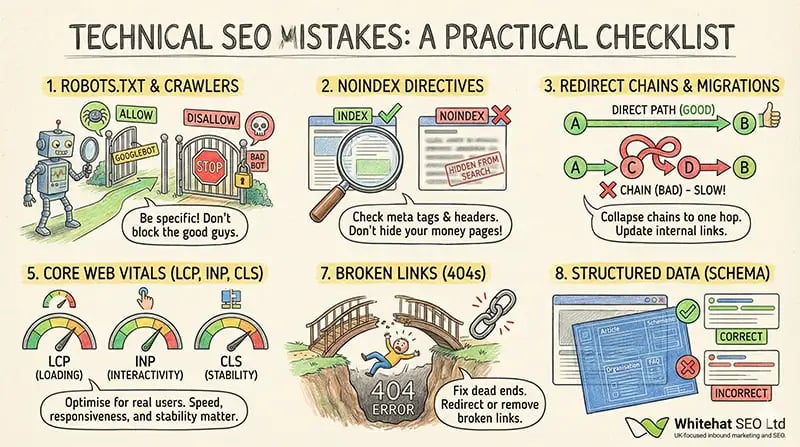
1) Blocking crawlers with robots.txt (and forgetting AI crawlers)
Robots.txt is powerful. It’s also the SEO equivalent of “pulling the plug” if you do it wrong. The classic mistake is leaving a migration rule behind: Disallow: /
How to spot it quickly
- Sudden indexing drop in Google Search Console (Coverage / Pages report).
- Key pages show as “Blocked by robots.txt”.
- Your logs show Googlebot repeatedly hitting robots.txt and then leaving.
Fix
- Make robots rules as specific as possible (block only the folders/URL patterns you truly don’t want crawled).
- Double-check you’re not blocking CSS/JS assets needed for rendering.
- Decide your AI crawler policy (allow/deny). OpenAI documents GPTBot and OAI-SearchBot directives for robots.txt, and they’re managed independently. :contentReference[oaicite:1]{index=1}
If you’re working on “AI discovery” alongside SEO, you’ll also like: SEO isn’t dead — it’s evolving.
2) Unintentional noindex / X-Robots-Tag directives
“Noindex” is the silent assassin. It’s common on staging sites, PPC landing pages, thin tag pages — and then it accidentally ships to production. Google documents how meta name="robots" and the X-Robots-Tag header control indexing. :contentReference[oaicite:2]{index=2}
How to spot it quickly
- In GSC, pages are crawled but excluded as “Noindex”.
- A crawl tool shows indexability = false on important URLs.
- Server/CDN rules add headers globally (surprisingly common).
Fix
- Audit templates for accidental
noindexon category, service and blog pages. - Check HTTP headers on HTML and PDFs (X-Robots-Tag can apply to non-HTML assets).
- After changes, request reindexing for key pages and validate in GSC.
3) Redirect chains, internal redirects and messy migrations
Redirects are normal. Redirect chains are self-inflicted chaos: slower pages, diluted signals, and crawler time wasted. Google’s guidance covers redirect types and common scenarios where redirects are useful — but “useful” doesn’t mean “infinite”. :contentReference[oaicite:3]{index=3}
Typical chain patterns
- HTTP → HTTPS → www → new URL slug
- Old blog URL → interim campaign URL → final URL
- Internal links still pointing at redirected URLs (easy win)
Fix
- Collapse chains so they redirect in one hop to the final destination.
- Update internal links so they point directly to the final URL (no internal redirects).
- If you’re migrating, plan it properly (redirect mapping, sitemap, monitoring). This is where a specialist audit pays for itself fast.
If you’re planning a redesign or domain move, read: Web Migration SEO: Key Steps for Success.
4) Canonical mistakes and duplicate URL sprawl
Duplicate content isn’t always “copy/paste”. It’s often your CMS creating many URLs for the same thing: parameters, filters, trailing slashes, print views, session IDs, tracking codes, or multiple category paths. Google defines canonicalisation as choosing a representative URL from duplicates — and it’s heavily influenced by consistency in your signals.
How to spot it quickly
- GSC shows lots of “Duplicate, Google chose different canonical than user”.
- Your crawl has thousands of parameter URLs with thin or identical content.
- Internal links point to multiple versions of the “same” page.
Fix
- Pick one canonical URL format (https, www vs non-www, trailing slash rules) and enforce it.
- Ensure canonicals are absolute URLs and don’t point to redirected URLs.
- Control parameter crawling where appropriate (and avoid creating crawl traps with infinite filter combos).
This ties closely to site structure and internal linking — see: Effective Website Architecture SEO for Growth.
5) Core Web Vitals and performance debt
Performance is technical SEO. Full stop. Google’s Core Web Vitals now measure: LCP (loading), INP (interactivity) and CLS (visual stability). INP officially replaced FID as a Core Web Vital in March 2024.
What usually causes “bad” CWV on business sites
- Heavy hero images/video with no optimisation (LCP).
- Third-party scripts (chat, tracking, tag managers) blocking main thread (INP).
- Late-loading fonts/ads causing layout jumps (CLS).
Fix (prioritised)
- Measure real users (CrUX/GSC) before you chase Lighthouse perfection.
- Optimise images (modern formats, correct sizing, compression) and preload critical assets.
- Trim third-party scripts and delay anything not needed for the first interaction.
- Reserve space for dynamic elements to prevent CLS.
If you’re improving content too, pair this with: Best Practices for On-Page SEO.
6) JavaScript rendering and lazy-loaded “invisible” content
JavaScript isn’t “bad for SEO”, but it’s an easy way to accidentally hide the very content you want indexed. If your key content only appears after complex client-side rendering, or it’s gated behind user interactions, crawlers may see a thinner version of the page than humans do.
Common failure modes
- Lazy-loaded images without proper HTML fallbacks (they never load for bots).
- FAQ tabs/accordions where the content isn’t in the initial DOM.
- Critical internal links injected only after JS runs.
Fix
- Ensure core content renders server-side (or at least is present in the initial HTML).
- Use progressive enhancement: content first, interaction second.
- Test with “View source” and URL Inspection in GSC (rendered HTML vs fetched HTML).
7) Broken links and “digital decay”
Broken links are more than a UX annoyance. They waste crawl budget, create dead ends for users, and can reduce trust. Pew Research found that 23% of news webpages and 21% of government webpages contained at least one broken link in their analysis.
How to spot it quickly
- Crawl reports show 404s/410s on internal links.
- High exits on pages with lots of resource links.
- External citations in older posts point to dead studies/tools.
Fix
- Fix internal 4xx first (fastest SEO win).
- Where external references are dead, replace with reputable equivalents.
- For removed pages with backlinks, 301 redirect to the closest relevant page (not the homepage).
8) Missing / incorrect structured data (schema)
Structured data won’t magically “rank you” — but it helps search engines interpret your content and can unlock enhanced results. Google’s general structured data policies are updated regularly and set the rules for eligibility.
What goes wrong in the real world
- Markup doesn’t match visible page content (fails eligibility).
- Organisation, author and page type are inconsistent across the site.
- FAQ schema added, then FAQs removed from the page (classic).
Fix
- Start with clean basics: Article/BlogPosting, Organisation, Breadcrumbs.
- Use FAQPage only when questions and answers are visible on-page.
- Validate in Google’s Rich Results tooling and monitor GSC Enhancements.
Want a broader strategic view beyond technical fixes? See services overview.
9) Hreflang return-tag errors (UK + international sites)
If you have UK pages alongside other countries/languages, hreflang helps Google serve the right version. The easiest mistake: missing return links. If Page A points to Page B, Page B must point back — and each version should self-reference.
How to spot it quickly
- GSC international targeting / hreflang errors.
- Mismatched canonicals between regional variants.
- Incorrect language/region codes (en-GB vs en-US matters).
Fix
- Generate hreflang in a single source of truth (CMS or feed), not manually in templates.
- Validate return tags and self-references at scale (crawl + sample-check).
- Keep canonicals consistent with hreflang intent (don’t canonicalise all variants to one URL).
10-minute technical SEO triage checklist
If you only do one thing after reading this, do this. It catches the biggest “rankings dropped overnight” problems fast.
If you’d rather not DIY this: we run technical audits that map issues to fixes and impact — then implement them with your dev team (or ours). Start here: Contact Whitehat.
Frequently Asked Questions
How do I know if Google can crawl my site properly?
Check robots.txt, then use Google Search Console’s URL Inspection to confirm “Crawled” and “Indexed” status. If important URLs are blocked by robots.txt, or excluded due to noindex, fix those first — they’re foundational.
Should I block AI crawlers like GPTBot?
Depends on your business goals. If you want to be discoverable in AI experiences, you may allow specific crawlers. OpenAI provides official guidance and separate controls for different bots, so you can choose precisely what you allow. :contentReference[oaicite:8]{index=8}
Do redirect chains still matter if Google passes signals through redirects?
Yes. Even when signals carry, chains still add latency, increase crawl work, and create maintenance debt. Keep redirects to one hop and update internal links so you’re not forcing crawlers through unnecessary steps.
What’s the fastest technical SEO win for most sites?
Fix internal 404s, collapse redirect chains, and remove accidental noindex directives. Those three routinely unlock crawls and re-indexing without any content changes.
Do I need schema markup on blog posts?
You don’t “need” it to rank, but it improves clarity and can unlock enhanced results when implemented correctly. Follow Google’s structured data policies and ensure the markup matches visible content.
References (verified live)
Internal reading: SEO services, Inbound marketing services, Contact.