
Technical SEO Guide
Mobile website optimisation has reached a critical inflection point for UK businesses. The statistics paint a clear picture: mobile devices generate over 62% of global web traffic, yet mobile conversion rates lag at just 1.82% compared to desktop's 3.90%. This conversion gap represents one of the largest optimisation opportunities available to businesses willing to invest in mobile excellence.
Mobile Website Optimisation: The Complete UK Guide for 2026
How to capture the 50% competitive advantage most UK businesses are missing
For UK companies specifically, the opportunity is even more pronounced. According to Whitehat SEO's analysis of UK business websites, only 47% currently meet Core Web Vitals thresholds—meaning more than half of your competitors are handing you a ranking advantage on a plate.
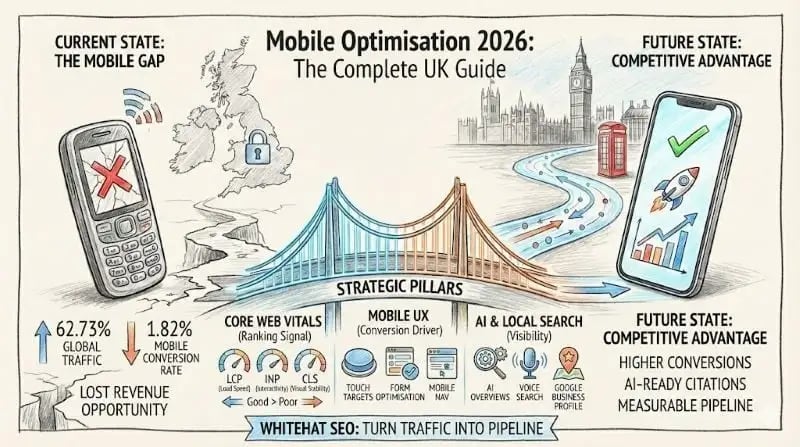
This comprehensive guide covers everything you need to know about mobile optimisation in 2026, from technical requirements and Core Web Vitals to mobile UX best practices and the growing importance of AI search optimisation. Whether you're looking to improve your SEO performance or preparing for the AI-powered search landscape, mobile optimisation is now non-negotiable.
Mobile usage statistics every UK business needs to know
Mobile traffic dominates the global web landscape, with 62.73% of all web traffic coming from mobile devices in Q2 2025, according to StatCounter data. However, the UK presents a more balanced picture: approximately 48.82% mobile, 46.76% desktop, and 4.41% tablet.
What makes these statistics actionable for UK businesses? Consider the conversion gap: despite receiving the majority of traffic, mobile converts at roughly half the rate of desktop—1.82% versus 3.90%, according to Smart Insights and Omniconvert research. This represents a massive optimisation opportunity for businesses that invest in mobile user experience.
| Metric | Value | Source |
|---|---|---|
| Global mobile traffic share (Q2 2025) | 62.73% | Statista/StatCounter |
| UK mobile internet users | 58 million (84%) | Statista |
| UK online orders via mobile | 70% | Oyelabs |
| Mobile conversion rate | 1.82% | Omniconvert |
| Desktop conversion rate | 3.90% | Omniconvert |
| Projected m-commerce revenue 2025 | $2.51 trillion | Oberlo/Statista |
The commerce implications are substantial. Global m-commerce revenue is projected to reach $2.51 trillion in 2025—a 21% increase from 2024—with mobile expected to account for 59% of all e-commerce transactions. For UK businesses, 70% of online orders are already placed via mobile devices.
Key insight: The gap between mobile traffic (62%+) and mobile conversion rates (1.82%) represents one of the largest optimisation opportunities available to UK businesses. Closing even a portion of this gap can dramatically improve revenue without increasing traffic.
What Google's mobile-first indexing means for your site
Google completed its transition to 100% mobile-first indexing on 5 July 2024. This means every website is now crawled and indexed exclusively using Googlebot Smartphone. As Google's John Mueller stated: "The small set of sites we've still been crawling with desktop Googlebot will be crawled with mobile Googlebot after July 5, 2024."
The practical implication is straightforward but critical: if your site isn't accessible on mobile, it will not be indexed at all. This isn't a ranking factor—it's a binary requirement for appearing in search results.
How to check your mobile-first indexing status
You can verify your site's indexing status through Google Search Console. Navigate to Settings → Indexing Status to see the crawler type, or use the URL Inspection Tool and check the "Crawled as" section—"Google smartphone" confirms mobile-first indexing.
Common mobile-first indexing errors and how to fix them
Whitehat SEO's technical audits frequently identify these mobile-first indexing issues that prevent proper crawling:
- Missing structured data on mobile: Ensure identical structured data appears on both mobile and desktop versions
- noindex tag on mobile version: Use the same robots meta tags across both versions
- Blocked resources: Don't use disallow rules on mobile CSS, JS, or images in robots.txt
- Lazy-load content requiring user interaction: Google won't click buttons to load content—ensure content loads automatically
- Multiple desktop pages redirecting to same mobile page: Create equivalent mobile versions for each desktop page
Google's recommended approach remains responsive web design—a single URL that adapts to screen size—ensuring content parity between mobile and desktop experiences. This approach simplifies maintenance and eliminates most mobile-first indexing issues. For a comprehensive review of your site's technical health, consider a website audit to identify priorities.
Core Web Vitals thresholds and how to meet them
Core Web Vitals are Google's standardised metrics for measuring user experience. In March 2024, Interaction to Next Paint (INP) replaced First Input Delay (FID) as the responsiveness metric, creating a more comprehensive measure of interactivity that assesses all interactions throughout a user's session.
| Metric | Good | Needs Improvement | Poor |
|---|---|---|---|
| LCP (Largest Contentful Paint) | ≤2.5s | 2.5s - 4.0s | >4.0s |
| INP (Interaction to Next Paint) | ≤200ms | 200ms - 500ms | >500ms |
| CLS (Cumulative Layout Shift) | ≤0.1 | 0.1 - 0.25 | >0.25 |
The current pass rates reveal a significant competitive opportunity. According to HTTP Archive CrUX Report 2025 data, only 49.7% of mobile websites pass all Core Web Vitals thresholds, compared to 57.1% on desktop. Whitehat SEO's analysis of UK business websites found an even lower pass rate of just 47%—meaning more than half of UK businesses are failing these basic performance standards.
The business impact of Core Web Vitals
Core Web Vitals improvements translate directly to business outcomes. Industry case studies demonstrate the commercial value:
- Pinterest achieved a 15% increase in SEO traffic after reducing wait time by 40%
- Vodafone saw an 8% sales increase following a 31% improvement in LCP
- Sites meeting Core Web Vitals thresholds see a 24% reduction in page abandonment, according to Google
- 53% of mobile users abandon sites that take longer than 3 seconds to load
Critical distinction: Field Data (from Chrome User Experience Report) is what Google uses for ranking signals. Lab Data (from Lighthouse) is diagnostic only. When testing, prioritise PageSpeed Insights field data over lab simulations. Learn more about on-page SEO best practices including Core Web Vitals optimisation.
Mobile UX best practices that actually convert
Mobile user experience directly impacts both conversion rates and SEO performance. With mobile cart abandonment rates at 69.9% according to Baymard Institute, optimising the mobile user journey is essential for capturing revenue from mobile traffic.
Touch target sizes
Touch targets that are too small create frustration and errors. Current guidelines recommend a minimum of 44 × 44 CSS pixels for all interactive elements (WCAG 2.5.5 AAA standard), with at least 8dp spacing between targets. The average fingertip width spans 45-57 pixels according to MIT Touch Lab research—buttons smaller than this cause accidental taps and user frustration.
Mobile navigation patterns
Bottom navigation is now preferred over hamburger menus because it sits within the natural "thumb zone" for one-handed use. Research from Nielsen Norman Group found that combination navigation (visible tab bar plus hamburger for secondary options) achieves 86% usage rates compared to just 57% for hamburger menus alone.
Key recommendations: limit tab bars to 5 options maximum, and always use icons with labels—icons alone reduce clarity by 57%.
Mobile form optimisation
Forms represent a critical conversion point where mobile UX failures directly impact revenue. The statistics are compelling:
- Single-column forms complete 15.4 seconds faster than multi-column layouts
- Autofill increases completion rates by 25% and speeds completion by 30%
- Multi-step forms deliver 86% higher conversions than single-page forms
- Form abandonment rate sits at 81%
Critical implementation detail: text input font size must be at least 16px to prevent iOS auto-zoom when users tap on form fields. This single oversight creates a jarring experience that damages conversion rates.
Mobile pop-up guidelines
Google penalises intrusive interstitials that damage mobile user experience. What triggers penalties: pop-ups covering most or all content immediately after clicking from search, standalone interstitials blocking content, and above-the-fold layouts requiring dismissal before accessing content.
What's allowed: legal requirement interstitials (cookie consent, age verification), login dialogs for gated content, and banners using reasonable screen space (under 15%) that are easily dismissible. Exit-intent popups remain effective, with an average conversion rate of 11.09%.
Technical mobile SEO requirements
Technical mobile SEO encompasses the foundational elements that enable Google to crawl, index, and rank your mobile content effectively. Getting these fundamentals right is prerequisite to any other optimisation efforts.
Responsive design implementation
Google explicitly recommends responsive web design as the preferred approach—single URL, same HTML, with CSS adapting to screen size. This simplifies indexing, eliminates duplicate content issues, and ensures consistent user experience across devices.
The correct viewport meta tag configuration:
<meta name="viewport" content="width=device-width, initial-scale=1.0">Avoid maximum-scale=1.0 or user-scalable=no—these cause accessibility issues and can trigger ranking penalties.
Structured data for mobile
Structured data must be identical on mobile and desktop versions since Google uses the mobile version for indexing. Priority schema types include Breadcrumb, Product, VideoObject, Article, FAQ, and LocalBusiness. According to industry research, pages with schema markup achieve a 36.6% increase in search visibility.
Use JSON-LD format (Google's recommendation) and ensure all URLs in your markup point to mobile-accessible pages.
Image optimisation for mobile
Modern image formats significantly reduce file sizes and improve loading times. The recommended format hierarchy:
- AVIF: Best compression (50%+ smaller than JPEG)
- WebP: Wide browser support (25-34% smaller than JPEG)
- JPEG/PNG: Fallback only
Always include width and height attributes to prevent Cumulative Layout Shift. Use lazy loading for below-the-fold images only—lazy loading above-the-fold images negatively impacts LCP. For hero images, use preload: <link rel="preload" as="image" href="hero.webp">
Is AMP still relevant?
AMP (Accelerated Mobile Pages) is not dead but has minimal SEO impact in 2025/2026. It's no longer a ranking factor, Top Stories no longer require AMP (since May 2021), and major platforms including Twitter/X and LinkedIn no longer support it.
Focus instead on Core Web Vitals optimisation with standard responsive design—this is now the approach Google prioritises. AMP might still suit publishers using Google Web Stories or sites with limited development resources struggling with mobile performance, but for most businesses, the constraints outweigh the benefits.
Mobile local SEO and 'near me' searches
Mobile and local search are deeply intertwined. According to Google's Think with Google research, 88% of smartphone users who conduct local searches visit or call a store within 24 hours, and 78% of mobile local searches result in an offline purchase.
The growth in local intent is accelerating. "Open now near me" searches have increased 400% year-over-year, and 60% of smartphone users use click-to-call functionality directly from search results. For businesses with physical locations, mobile local SEO isn't optional—it's where high-intent customers are searching.
Google Business Profile optimisation
Your Google Business Profile is often the first touchpoint for mobile local searchers. According to Birdeye's 2025 analysis, 86% of Google Business Profile views come from discovery searches—people searching for categories rather than specific business names.
The data on visual content is compelling: businesses with 100+ photos receive 520% more calls and 2,717% more direction requests than those without. For comprehensive guidance, see our article on mastering Google Business Profile.
Priority optimisations include enabling GBP messaging (Google monitors response times), using Reserve with Google (only 5% of businesses utilise this), responding to all reviews within 2-7 days, and uploading high-quality photos and videos regularly.
Click-to-call implementation
Mobile users expect to call directly from search results. Implement clickable phone links using the tel: protocol and include phone numbers in LocalBusiness schema markup to maximise visibility. Our local SEO guide covers implementation details.
Key local SEO statistics for mobile:
- 78% of mobile/voice "near me" queries lead to offline purchase
- 76% of people who search for something nearby visit a business within a day
- Voice searches are 3x more likely to have local intent than text searches
- 80% of consumers don't trust businesses with inconsistent NAP (name, address, phone)
Optimising for AI search on mobile devices
AI Overviews now appear in over 50% of searches according to Semrush research, with mobile AI Overview presence increasing 475% year-over-year. The average AI Overview occupies 1,764 pixels on mobile screens, pushing organic listings down by 140% or more. This represents a fundamental shift in how mobile users interact with search results.
As Google's Danny Sullivan stated: "Good SEO is good GEO"—the same fundamentals that drive traditional search performance also influence AI Overview rankings and citations. However, content structure becomes even more critical when optimising for AI extraction.
Mobile-specific GEO/AEO strategies
Optimising for AI answer engines (what Whitehat SEO terms AEO—Answer Engine Optimisation) requires specific structural approaches:
- Structured data: FAQ, Product, LocalBusiness, and HowTo schema in JSON-LD format
- Content structure: Clear H1 with primary keyword, followed by a 40-60 word summary answer immediately after
- Question-based headings: H2/H3 headers answering who, what, where, when, why, and how
- E-E-A-T signals: Author credentials, expertise indicators, and trust signals
- Fast mobile performance: Core Web Vitals compliance is essential for AI consideration
For a deeper exploration of AI search optimisation, read our guide on how SEO is evolving for the AI era.
Voice search considerations
Voice search on mobile devices continues growing, with over 153.5 million Americans now using voice assistants. Voice queries are three times more likely to have local intent than text searches, and 40% of voice answers come from featured snippets.
Optimising for voice means optimising for conversational queries and direct answers—the same structural approaches that benefit AI Overview visibility.
The zero-click reality: Approximately 60% of Google searches now end without a click to any website. For mobile users seeing AI Overviews that answer their questions directly, the click-through imperative is even lower. The strategic response isn't to fight this trend but to ensure your brand appears within AI-generated answers—becoming the cited source rather than hoping for the click.
Testing tools now that Mobile-Friendly Test is deprecated
Google deprecated the Mobile-Friendly Test tool, Mobile Usability Report in Search Console, and the Mobile-Friendly Test API in December 2023. As Google stated: "In the nearly ten years since we initially launched this report, many other robust resources for evaluating mobile usability have emerged, including Lighthouse from Chrome."
Currently recommended testing tools
| Tool | URL | Use Case |
|---|---|---|
| Google Lighthouse | Chrome DevTools | Performance, Accessibility, SEO, Best Practices audits |
| PageSpeed Insights | pagespeed.web.dev | Field data (CrUX) + lab data; mobile AND desktop |
| Search Console CWV Report | search.google.com/search-console | Real user data, mobile/desktop split |
| Rich Results Test | search.google.com/test/rich-results | View rendered HTML, test structured data |
| WebPageTest | webpagetest.org | Advanced testing with real device simulation |
| DebugBear | debugbear.com | Enhanced Lighthouse tests, RUM + CrUX data |
Lighthouse is updating significantly through 2025—v12.6 introduced toggleable views, v12.7 (June 2025) defaults to newer insights audits, and v13 (expected October 2025) will remove old audit data completely. Stay current with these tools to maintain accurate mobile performance assessments.
Mobile optimisation checklist for UK businesses
Use this checklist to assess your current mobile optimisation status and prioritise improvements:
Technical Foundations
- ☐ Responsive design implemented with correct viewport meta tag
- ☐ Mobile and desktop content parity confirmed
- ☐ CSS, JS, and images not blocked in robots.txt
- ☐ Structured data identical on mobile and desktop
- ☐ No content hidden behind JavaScript or user interactions
Core Web Vitals
- ☐ LCP under 2.5 seconds
- ☐ INP under 200ms
- ☐ CLS under 0.1
- ☐ Images optimised (WebP/AVIF) with width/height attributes
- ☐ Above-the-fold images not lazy loaded
Mobile UX
- ☐ Touch targets minimum 44×44 CSS pixels
- ☐ Form inputs at least 16px font size
- ☐ No intrusive interstitials on landing pages
- ☐ Bottom navigation implemented for key actions
- ☐ Click-to-call functionality enabled
Local & AI Search
- ☐ Google Business Profile complete and optimised
- ☐ NAP consistency across all citations
- ☐ LocalBusiness schema implemented
- ☐ FAQ schema on relevant pages
- ☐ Content structured for AI extraction (clear answers, logical headings)
Frequently asked questions
How long does it take to see results from mobile optimisation?
Technical fixes like Core Web Vitals improvements can show measurable ranking impact within 28 days once Google re-crawls affected pages. Broader mobile UX improvements that affect conversion rates show results immediately in analytics. For local SEO improvements, Google Business Profile optimisations typically show results within 30-60 days.
Is mobile-first indexing the same as mobile-friendly?
No. Mobile-first indexing means Google uses the mobile version of your site for indexing and ranking—it doesn't guarantee your site is mobile-friendly or optimised. A site can be mobile-first indexed while still providing a poor mobile experience that harms conversions and rankings.
Should I still invest in AMP?
For most UK businesses, no. AMP is no longer a ranking factor, and the constraints it imposes (limited JavaScript, CSS restrictions, content served from Google's domain) outweigh the benefits. Focus instead on meeting Core Web Vitals thresholds with standard responsive design—this is now Google's preferred approach.
How do I check if my site passes Core Web Vitals?
Use PageSpeed Insights (pagespeed.web.dev) and check the field data section—this shows real user data from the Chrome User Experience Report. Google Search Console's Core Web Vitals report provides site-wide assessment. Aim for all three metrics (LCP, INP, CLS) in the "Good" threshold across mobile specifically.
What's the relationship between mobile optimisation and AI search?
AI systems like Google's AI Overviews prioritise well-structured, fast-loading content. Sites that perform poorly on mobile are less likely to be cited in AI-generated answers. The same factors that improve mobile experience—clear structure, fast performance, accessible content—also improve AI visibility.
Ready to capture your mobile opportunity?
With more than half of UK businesses failing Core Web Vitals and mobile conversion rates sitting at half of desktop, the opportunity for competitive advantage is substantial. Whitehat SEO's comprehensive SEO services include mobile technical audits, Core Web Vitals optimisation, and AI search strategies—all integrated with HubSpot for closed-loop attribution.
References and sources
- StatCounter Global Stats – Mobile vs Desktop Market Share: gs.statcounter.com
- Google Search Central – Mobile-First Indexing: developers.google.com
- HTTP Archive – Core Web Vitals Technology Report: httparchive.org
- Google – Core Web Vitals Documentation: web.dev
- Think with Google – Local Search Consumer Insights: thinkwithgoogle.com
- Baymard Institute – Cart Abandonment Statistics: baymard.com
- WCAG – Touch Target Size Guidelines: w3.org
- Semrush – AI Overviews Study 2025: semrush.com