
Technical SEO Guide
The web performance landscape has shifted dramatically since March 2024, when Google replaced First Input Delay (FID) with Interaction to Next Paint (INP) as a Core Web Vital. This change fundamentally altered how responsiveness is measured, moving from assessing only the first interaction to evaluating every interaction throughout a user's session.
Website Performance Optimisation in 2026: The Complete Technical Guide
Website performance directly impacts your bottom line. Whitehat SEO's analysis of Core Web Vitals data shows that 51-53% of websites now pass all metrics—up from just 31% in 2022—yet businesses achieving optimal performance still gain significant competitive advantage, with case studies demonstrating up to 53% higher revenue per visitor from speed improvements alone.
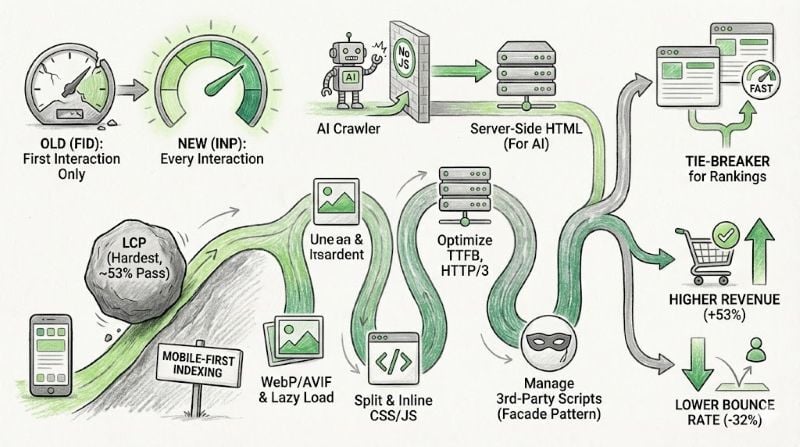
The business case for speed optimisation is compelling. Vodafone's A/B testing revealed an 8% increase in sales from a 31% LCP improvement. Rakuten 24 achieved 53% higher revenue per visitor after Core Web Vitals optimisation. These aren't marginal gains—they represent the difference between thriving and merely surviving in competitive markets.
Yet the relationship between speed and SEO rankings remains nuanced. Google's John Mueller confirmed in October 2024 that Core Web Vitals are not primary ranking factors—they function as tie-breakers between similarly relevant pages. The real value lies in user experience: bounce rates increase by 32% when load time rises from one to three seconds. For businesses serious about conversion optimisation, performance is non-negotiable.
This guide provides the technical foundations you need to achieve measurable performance gains—the same approach Whitehat SEO applies in our website audit services to identify opportunities and deliver results for B2B clients across the UK.
The INP transition reshaped responsiveness measurement
Google officially replaced FID with INP on 12 March 2024—the most significant Core Web Vitals change since their 2021 introduction. Unlike FID, which measured only the delay of a page's first interaction, INP evaluates all interactions throughout a user's session. This captures the complete experience from input delay through processing to visual presentation.
Current Core Web Vitals Thresholds for 2026
LCP (Largest Contentful Paint)
≤2.5 seconds
Good | >4s = Poor
INP (Interaction to Next Paint)
≤200 milliseconds
Good | >500ms = Poor
CLS (Cumulative Layout Shift)
≤0.1
Good | >0.25 = Poor
FID was fully deprecated from all Chrome tools on 9 September 2024, and Search Console now exclusively reports INP data. The key distinction matters for technical implementation: FID captured only input delay on first interaction, while INP measures input delay plus processing time plus presentation delay across every user interaction. This makes INP significantly harder to pass for JavaScript-heavy applications with complex event handlers.
For businesses running HubSpot or similar marketing platforms, this shift demands particular attention to how interactive elements—forms, chat widgets, dynamic content—affect responsiveness. Our HubSpot onboarding services address these performance considerations from the start.
Mobile performance remains the critical challenge
HTTP Archive's 2024 Web Almanac found 43% of mobile origins and 54% of desktop origins now pass all three Core Web Vitals—representing substantial improvement from prior years. DebugBear's January 2025 analysis shows slightly higher figures at 49.7% mobile and 57.1% desktop. The consistent 10-percentage-point gap between mobile and desktop reflects fundamental mobile challenges: constrained CPU, variable network conditions, and limited memory.
Individual metric pass rates reveal where optimisation efforts should focus. CLS enjoys the highest compliance at approximately 76% of sites achieving good scores—reflecting successful industry adoption of explicit dimensions for media elements. INP follows at roughly 64% passing, while LCP remains the most challenging at approximately 53% on mobile. LCP's difficulty stems from its dependency on multiple factors: server response time, resource prioritisation, render-blocking resources, and actual content loading.
⚠️Counterintuitive Finding
Website popularity correlates inversely with Core Web Vitals compliance. Among the top 1,000 sites, only 40% pass on mobile compared to 54% on desktop. Highly-trafficked sites often carry more third-party scripts, advertising integrations, and complex features that degrade performance despite their resources.
Google completed its mobile-first indexing transition on 5 July 2024, meaning all websites are now crawled exclusively by Googlebot Smartphone. Mobile performance metrics determine rankings across both mobile and desktop search results. Sites inaccessible on mobile devices simply won't be indexed—making mobile optimisation essential for any serious SEO strategy.
Speed influences rankings as a tie-breaker, not a dominant factor
Google's official position, articulated by Search Advocate John Mueller in October 2024, explicitly downplays Core Web Vitals' ranking weight. Mueller advised against over-focusing on tweaking scores just for SEO, while acknowledging that good user experience prevents wasted first-time visitors.
Backlinko's analysis of 11.8 million Google search results found minimal correlation between site speed and rankings when examining aggregate data. However, this finding requires context: Core Web Vitals function as a tie-breaker between pages with similar content quality rather than a primary ranking signal. When two pages equally address a query, better Core Web Vitals scores can determine which ranks higher.
Advanced Web Ranking's study of 3 million pages found higher Core Web Vitals pass rates correlating with higher ranking positions—though this association may reflect that better-resourced sites invest in both performance and content. Screaming Frog's research showed URLs in position one were 10% more likely to pass Core Web Vitals assessment than those in position nine.
The practical implication for B2B marketers: performance optimisation won't compensate for weak content, but it can provide the edge needed to outrank competitors with equivalent content quality. This is why Whitehat SEO's approach combines technical performance optimisation with strategic content marketing—one without the other leaves opportunity on the table.
Conversion impact data makes the business case for speed
The Deloitte "Milliseconds Make Millions" study, analysing 30 million user sessions across 37 brands, established that a mere 0.1-second improvement yields measurable business results: 8.4% increase in retail conversions, 9.2% higher average order value, and 10.1% improvement in travel conversions. For luxury brands, the same tenth-second improvement drove 40.1% more add-to-basket actions.
Documented Performance Case Studies
Vodafone
31% LCP improvement → 8% more sales, 15% better lead-to-visit rate
Rakuten 24
Core Web Vitals optimisation → 53% higher revenue per visitor, 33% conversion increase
The Economic Times
INP improved from 1,000ms to 257ms → 50% lower bounce rates, 43% more pageviews
Time to Interactive reduced from 23s to 5.6s → 40% increase in signup conversions
Classic benchmarks continue to inform investment decisions. Amazon's finding that every 100ms of latency costs 1% in sales translates to billions in lost revenue at scale. Walmart documented a 2% conversion increase for every one-second improvement in load time. BBC found they lost 10% of users for every additional second of page load time across their 207 million monthly visitors.
Bounce rate correlations establish clear thresholds. When page load increases from one second to three seconds, bounce rates rise 32%. At five seconds, bounce increases reach 90%. These figures explain why 53% of mobile visitors abandon sites taking longer than three seconds to load.
Image optimisation leads modern performance techniques
WebP has achieved universal adoption status with 97% browser support and 25-35% better compression than JPEG. AVIF offers even more aggressive compression—up to 50% smaller files in some cases—with near-universal modern browser support in 2025. The recommended implementation pattern uses the picture element with AVIF as primary source, WebP fallback, and JPEG as final fallback.
Native lazy loading via the loading="lazy" attribute is now the standard approach for below-fold images, eliminating the need for JavaScript libraries in most cases. The critical rule: never lazy-load above-fold images, particularly LCP elements. Instead, use fetchpriority="high" for hero images to signal browser prioritisation.
Always specify explicit width and height attributes to prevent layout shifts during image loading. Responsive images using srcset and sizes attributes prevent the wasteful pattern of serving 2400px images to 375px mobile screens—a practice that wastes up to 85% of bandwidth. Compression typically matters more than format selection; most hero images should target under 100KB file size regardless of format.
JavaScript and CSS strategies prioritise critical rendering
Code splitting via dynamic imports has become essential for JavaScript-heavy applications. Route-based splitting loads code for each page separately, while component-based splitting lazy-loads heavy interface elements. Initial JavaScript bundles should remain minimal to avoid blocking INP.
Critical CSS inlining—extracting and placing above-fold styles directly in the HTML head—eliminates render-blocking stylesheets for initial content. Target above-fold content under 14KB to fit within TCP's initial congestion window. Tools like Critical and Penthouse automate critical CSS extraction.
Script Loading Best Practices
- Use
deferfor most scripts — downloads in parallel, executes after DOM parsing, maintains execution order - Use
asyncfor independent scripts — analytics and tracking that don't depend on DOM or other scripts - Place scripts in the
head— with defer/async attributes, not at body end - Use Chrome DevTools' Coverage panel — identifies unused CSS and JavaScript, highlighting dead code for removal
For sites using frameworks like Tailwind or Bootstrap, PurgeCSS removes unused utility classes, often reducing CSS size by 80% or more. This type of optimisation is standard practice in our HubSpot website design projects.
Server-side optimisation establishes performance foundations
TTFB targets have firmed at 800ms or below for good performance, with over 1.8 seconds rated poor. Optimal sites target under 200ms TTFB, achievable through CDN edge caching, efficient backend processing, and appropriate caching layers. TTFB components include DNS lookup (target under 100ms), TCP connection (under 100ms), TLS handshake (under 150ms), and server processing.
HTTP/3 adoption has accelerated, now handling 30-35% of global web traffic. Built on QUIC's UDP foundation, HTTP/3 eliminates TCP's head-of-line blocking problem, achieving 41.8% reduction in median TTFB compared to HTTP/2 in Catchpoint's studies. Zero Round-Trip Time (0-RTT) connections for returning visitors provide additional latency benefits. Major CDNs including Cloudflare, Fastly, and AWS CloudFront fully support HTTP/3.
Browser caching should use aggressive policies for static assets: Cache-Control: public, max-age=31536000 (one year) with versioned filenames. HTML pages benefit from stale-while-revalidate strategies that serve cached content while refreshing in background. Edge computing via Cloudflare Workers, Vercel Edge Functions, or Lambda@Edge enables response manipulation at CDN edge locations.
Third-party scripts consume disproportionate performance budgets
An average website loads scripts from 23 different third-party domains, and over 94% of sites include at least some third-party resources. The performance impact is substantial: top third-party scripts block the main thread from 42 milliseconds to 1.6 seconds for over half of sites analysed. YouTube embeds represent a particularly egregious case, blocking the main thread for 4.5 seconds on 10% of mobile websites.
The facade pattern offers a proven mitigation strategy. Instead of loading third-party embeds immediately, facades display static placeholders that look like the embed. On hover, the page preconnects to the third-party origin. On click, the facade is replaced with the actual embed. The lite-youtube-embed library exemplifies this approach, loading a thumbnail with play button that only fetches YouTube's heavy player when clicked.
Management best practices include regular third-party audits using Lighthouse's "Reduce impact of third-party code" report, avoiding duplicate functionality (running two analytics platforms), setting performance budgets for external content, and using Chrome DevTools' request blocking feature to measure the impact of removing specific scripts.
AI crawlers introduce new performance considerations
AI crawlers from OpenAI, Anthropic, and Perplexity now represent significant traffic sources with distinct technical characteristics. GPTBot generated 569 million requests in a single month on Vercel's network alone, with traffic spikes reaching 10-20 times normal levels within minutes. All major AI crawlers—GPTBot, ClaudeBot, PerplexityBot—cannot render JavaScript, seeing only initial HTML responses.
This JavaScript limitation means content rendered client-side is invisible to AI training crawlers, potentially affecting whether sites are included in AI training data or cited in AI-generated responses. Server-side rendering or static HTML becomes essential for sites wanting AI visibility—a key consideration in Answer Engine Optimisation (AEO) strategy.
Performance directly impacts AI crawler behaviour. AI crawlers often have strict timeouts; slow sites might not be fully processed. While no AI company has published specific timeout thresholds, fast server response times—well under 30 seconds for full page loads—appear essential for complete crawling.
Anthropic's ClaudeBot uniquely supports the Crawl-delay directive in robots.txt, allowing sites to manage crawler request frequency. Among the top 1,000 websites, 21% have robots.txt rules for GPTBot, with 35.7% completely blocking it. Sites can strategically block training crawlers while allowing search crawlers to maintain visibility in AI-powered search results.
Building performance into your growth strategy
Website performance optimisation in 2025 requires attention to three interconnected dimensions: Core Web Vitals compliance for search visibility, user experience optimisation for conversion maximisation, and technical infrastructure for AI crawler accessibility. The March 2024 INP transition and July 2024 mobile-first indexing completion have established clear benchmarks—LCP ≤2.5s, INP ≤200ms, CLS ≤0.1—that roughly half of sites now meet.
The business case is unambiguous. Performance improvements measured in hundreds of milliseconds translate to measurable revenue gains, with documented examples spanning retail giants to regional publishers. Technical implementation has standardised around AVIF/WebP images with native lazy loading, code-split JavaScript with defer loading, edge-cached responses with HTTP/3 delivery, and carefully managed third-party scripts with facade patterns.
Looking ahead, the rise of AI crawlers adds a new dimension to performance optimisation. Their inability to render JavaScript, strict timeout requirements, and rapidly growing traffic volumes suggest that server-rendered content and responsive infrastructure will become increasingly critical for sites seeking visibility in both traditional search engines and AI-powered discovery platforms.
Frequently asked questions
How long does it take to see results from Core Web Vitals improvements?
Technical improvements can be implemented within weeks, but Google's Core Web Vitals report uses a 28-day rolling average of real user data. Most businesses see measurable conversion improvements immediately, while ranking impacts typically appear within one to three months as Google re-evaluates page experience signals.
What's the most important Core Web Vital to focus on first?
LCP (Largest Contentful Paint) typically delivers the biggest impact on both user experience and conversions. With only 53% of mobile sites achieving good LCP scores, it represents both the greatest challenge and opportunity. Start with image optimisation and server response time improvements for quickest gains.
Do Core Web Vitals affect SEO rankings significantly?
Core Web Vitals function as a tie-breaker rather than a dominant ranking factor. Google's John Mueller confirmed they're not "giant factors in ranking." However, their impact on user behaviour—bounce rates, engagement, conversions—indirectly affects SEO success. Whitehat SEO recommends treating performance as essential for user experience, with ranking benefits as a bonus.
Why did Google replace FID with INP?
FID only measured the delay before processing the first user interaction. INP measures all interactions throughout a session, capturing the complete responsiveness experience. Over 90% of sites passed FID, making it ineffective at differentiating performance quality. INP provides a more accurate picture of how responsive pages feel to actual users.
How do AI crawlers affect performance requirements?
AI crawlers cannot execute JavaScript, meaning client-side rendered content is invisible to them. They also have strict timeout limits and generate significant traffic spikes. For visibility in AI-powered search results and chatbot responses, sites need fast server response times, server-side rendering, and proper robots.txt configuration—considerations central to Whitehat SEO's Answer Engine Optimisation services.
Ready to improve your website performance?
Whitehat SEO's website audit identifies exactly where your site is losing visitors—and revenue. Get actionable recommendations from London's leading HubSpot Diamond Partner.
Book Your Free Website AuditReferences
- Google Search Central – Core Web Vitals
- Google Search Central Blog – Introducing INP to Core Web Vitals
- web.dev – Vodafone: A 31% improvement in LCP increased sales by 8%
- web.dev – The business impact of Core Web Vitals
- web.dev – Why does speed matter?
- Google Search Console Help – Core Web Vitals report
- DebugBear – Core Web Vitals Metrics and Thresholds