
How Does Colour Psychology Affect Website Design
Whitehat • Website Design • CRO • Accessibility • 2026
Colour psychology for website design (2026): how to build trust and increase conversions
Most “colour psychology” articles are basically horoscopes for designers. This one isn’t. Here’s how to use colour as conversion infrastructure—with accessibility, HubSpot implementation and measurement baked in.
Updated: 9 January 2026 • Reading time: ~10–12 minutes
Answer: Strategic colour psychology in website design uses contrast, hierarchy and accessibility to reduce cognitive load, build trust fast and guide B2B buyers towards the next step. In 2026, it’s less about “red means urgency” and more about making decisions feel effortless—so your key pages convert, and the results can be measured.
If you’re a B2B marketer, you already know the awkward truth: you can do everything “right” (content, SEO, paid, socials)… and still lose deals because your website feels a bit off. One common culprit is colour—specifically how it’s used to signal trust, clarity and the next step.
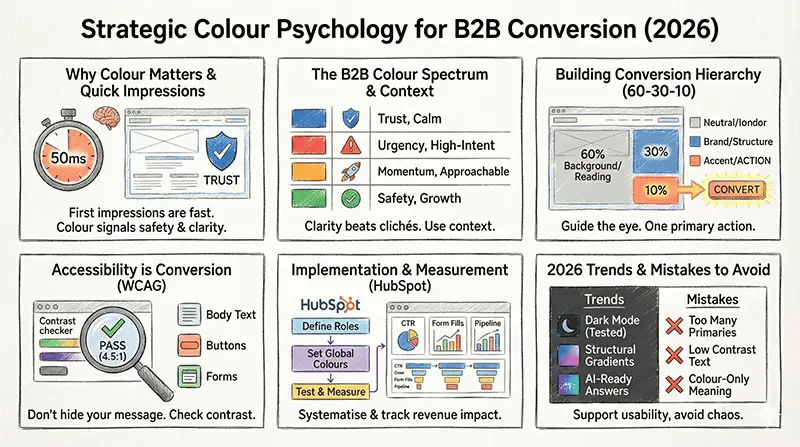
Want the practical route? If you’re planning a refresh on HubSpot, our HubSpot website design services are built around measurable conversion goals—so design decisions don’t die as “opinions”.
What this guide covers
- Why colour works (and why it matters more in B2B)
- Decoding the B2B colour spectrum (with real context)
- Using colour to build a conversion hierarchy
- Accessibility and compliance (WCAG contrast)
- Implementing colour in HubSpot (without chaos)
- How to measure impact (so you can defend the change)
- 2026 trends: dark mode, gradients and AI-assisted palettes
- FAQs
Key takeaways (save these for your next stakeholder meeting)
- First impressions happen fast (research shows people judge visual appeal in as little as 50 milliseconds).
- In accessibility testing of 1,000,000 home pages, low-contrast text remains the most common issue (2025).
- Google AI Overviews appeared on roughly ~16% of queries in late 2025—answer-first formatting is no longer optional.
- “Best button colour” is the wrong question—contrast and consistency beat folklore.
Why colour works (and why it matters more in B2B than you think)
In B2B, you’re rarely selling a £20 impulse buy. You’re selling risk reduction. The website’s job is to make the buyer feel: “This is credible. This is safe. This is the next logical step.”
The two mechanisms that matter (not “red = passion”)
- Visual hierarchy: colour helps the brain decide what’s important first.
- Cognitive fluency: if it’s easy to read and navigate, it feels more trustworthy.
There’s also a genuinely inconvenient stat from the research world: one frequently cited paper notes that people may make up their minds within 90 seconds of initial interaction, and a large portion of that initial assessment can be colour-driven. The takeaway isn’t “colour controls minds”. It’s “colour sets the frame your message is judged inside”.
If you suspect your palette (or contrast) is costing you leads, start with diagnosis, not guesswork: audit your site for conversion blockers and accessibility gaps before you repaint the whole house.
“In 2026, your colour palette isn’t just part of your brand guidelines; it’s part of your balance sheet. If your ‘Book Demo’ button blends into your background, you aren’t being subtle—you’re being invisible to revenue.”
— Clwyd Probert, CEO at Whitehat
Decoding the B2B colour spectrum (with context, not clichés)
Colours do carry cultural and emotional associations, but B2B websites live or die by clarity. Use this matrix as a starting point, then validate with data.
| Colour | B2B signal | Best used for | Watch-outs |
|---|---|---|---|
| Blue | Trust, competence, calm | Navigation, reassurance UI, security messaging | Category sameness (especially SaaS/tech) |
| Red | Urgency, importance, attention | High-intent actions (demo/quote), critical alerts | Overuse looks like errors/danger in regulated sectors |
| Orange | Momentum, warmth, approachability | Secondary conversions (download, subscribe) | Can feel “salesy” if paired with heavy urgency copy |
| Green | Safety, growth, success states | Success messages, confirmation states, sustainability | Red/green colour-blindness conflicts if meaning relies on colour alone |
| Black / dark mode | Premium, focus, modernity | Developer/technical audiences, premium positioning | Need careful contrast, logo variants, and focus states |
A quick sanity check: familiarity still matters
People expect your site to work like the other sites they already use. That’s why link colours, button affordances and form feedback patterns often matter more than a “unique” palette.
Using colour to build a conversion hierarchy (the “Revenue Engine” approach)
The highest-performing B2B sites treat colour like a system: neutrals for reading, brand colours for identity, one accent colour for action. It’s not artistry—it’s decision design.
1) The “one accent” rule
Pick one CTA colour for the primary action. Make it rare elsewhere, so it stands out without screaming.
2) The 60–30–10 split
60% neutral (background), 30% brand (structure), 10% accent (action). It keeps pages readable and directional.
3) Contrast beats “best colour”
What typically improves clicks is how colour changes hierarchy and makes the CTA more obvious, not a universal hue.
For deeper optimisation work, here are two related reads from our own blog (useful if you’re building a testing backlog): conversion optimisation strategies and how to optimise your website for conversions.
Accessibility is not optional (and it’s a conversion issue, not just a legal one)
If your text and buttons don’t have enough contrast, you’re effectively hiding your message from a chunk of your audience. WCAG provides clear guidance on minimum contrast ratios, and W3C continues to maintain WCAG 2.2 guidance and updates.
What to check first
- Body text contrast
- CTA buttons (default + hover + focus)
- Form labels + validation errors
- Links (especially if colour alone indicates “clickable”)
Quick win: check your primary CTA, body text, form labels and error states using the free WebAIM Contrast Checker.
Accessibility also overlaps with search performance (crawlable UX, reduced pogo-sticking, better engagement). If you want the whole stack to play nicely together, our technical SEO foundation work often pairs with design fixes for faster, compounding gains.
Implementing colour in HubSpot CMS (without chaos)
The mistake we see over and over: teams pick a palette in Figma, then implementation drifts over months—new landing pages, new modules, “just this one exception”… Suddenly the brand looks inconsistent, and CTAs stop behaving like CTAs.
Practical process (30 minutes to start, not a six-week rebrand)
- Define your roles: Primary brand colour, secondary/support colour, and one CTA accent colour (the “one accent” rule).
- Set global colours in your theme: Use a single source of truth so modules inherit the same tokens across pages.
- Create predictable states: Hover, focus and disabled styles should be obvious and accessible.
- Build a CTA hierarchy: Primary action (accent), secondary action (outline), tertiary (text link).
- Check contrast early: Run contrast checks on your core templates before launching campaigns.
- Test like a grown-up: A/B test colour changes on high-intent pages, then roll out winners sitewide.
If you want this done properly (theme tokens, modules, accessibility and tracking), that’s exactly what we do in our CRM-powered HubSpot website builds.
Measuring the impact (so design doesn’t get dismissed as “subjective”)
A colour change that improves click-through but reduces lead quality is not a win. Measure in a chain:
- Micro: CTA click-through rate and scroll depth.
- Conversion: form completion rate and error rate.
- Commercial: MQL→SQL rate, pipeline created, and close rate.
If attribution is the sticking point in your org, start here: measure the revenue impact of design with an attribution model that matches your buying cycle (and doesn’t dump everything into “direct / unknown”).
2026 trends: dark mode, gradients, and AI-assisted palettes (without losing your brand)
Trends are useful when they support usability. They’re expensive when they break readability or consistency.
1) Dark mode is mainstream, not “edgy”
Dark mode can reduce glare and feels premium, especially for technical audiences. But it magnifies sloppy colour systems—so define tokens, test contrast, and make sure your logo works on dark backgrounds.
2) Gradients are back (but keep them structural)
Gradients work best in hero panels and section backgrounds. Avoid gradient text and low-contrast overlays that fail accessibility checks.
3) “GEO” and AI answers change how your content is found
If your content doesn’t answer questions cleanly, it’s less likely to be surfaced in AI summaries. That’s why this post uses answer-first formatting, standalone sections and FAQ schema—because the web is now being read by machines first.
If you want to make that visibility repeatable across your site (not just in one blog post), see our Answer Engine Optimisation (AEO) services.
Common colour mistakes that quietly kill conversions
- Too many “primary” colours: if everything is highlighted, nothing is.
- CTA colour used in the logo and backgrounds: your action colour loses its ability to stand out.
- Low-contrast body text: people bounce because reading feels like effort (and they won’t explain why).
- Relying on colour alone: errors shown only in red, “required” fields only in red—this fails users with colour vision deficiency.
- Inconsistent meaning: if green means “success” in one flow, don’t use it as a destructive action elsewhere.
Shortcut: if your team is debating “which colour wins”, you’re probably missing a hierarchy decision. Decide what matters on each page first. Then colour becomes obvious.
Frequently Asked Questions
Does colour psychology really affect B2B conversions, or is it mostly a myth?
It affects behaviour through hierarchy and fluency. People notice contrasting elements first and interpret them faster; that changes click patterns and form completion. Use colour to make the next step obvious, then validate it with a test (don’t rely on “theory” as proof).
What is the best CTA button colour for a B2B website?
The best CTA colour is the one that creates clear contrast in your layout and is reserved for primary actions. What typically improves clicks is hierarchy and salience, not a magic hue.
How many colours should my website use?
Keep it simple: neutrals for reading, one or two brand colours for identity, and one accent colour for action. The 60–30–10 guideline is a practical starting point for avoiding “everything is loud” design.
How do I make brand colours accessible under WCAG?
Check contrast on real components (not just swatches). For normal text, aim for 4.5:1; for large text, 3:1. Use patterns, icons and labels so meaning isn’t colour-only, and test key flows with colour-vision simulation.
Can I personalise colours for different personas?
Yes—if the meaning stays consistent. Keep your base palette stable, then adjust accent colours by context (primary vs secondary action), or through personalisation rules. If you change meaning, you increase cognitive load and harm trust.
Why do colours look different on mobile?
Screen brightness, colour profiles and ambient light can change perception. Low-contrast combinations that “look fine” on a large monitor often fail on mobile. Test critical pages on a few real devices and avoid subtle contrast for body copy.
Want colour choices that are measurable, not debatable?
If you’re planning a redesign or conversion uplift in 2026, treat colour as part of the system: IA, copy, accessibility, tracking and testing. That’s the difference between a “prettier site” and a site that actually creates pipeline.
References
- Lindgaard, G. et al. (2006). “Attention web designers: You have 50 milliseconds to make a good first impression!” (PDF). View source.
- WebAIM (2025). The WebAIM Million: accessibility analysis of the top 1,000,000 home pages. View source.
- W3C (WCAG 2.2). WCAG updates note and WCAG 2.2 spec.
- WebAIM Contrast Checker (tool). View tool.
- Semrush (2025). AI Overviews study (10M+ keywords, Jan–Nov 2025). View source.
- Gartner (2024). “Only 52% of senior marketing leaders can prove marketing’s value…” (press release). View source.
- Singh, S. (2006). “Impact of color on marketing” (Management Decision). View source.
- Colour Blind Awareness (UK non-profit). Colour vision deficiency prevalence figures. View source.
- CXL (2022). “Which CTA Button Color Converts the Best?” (contrast and context). View source.
Note: This article focuses on practical application for B2B websites. If you’re testing colour changes, document your baseline metrics and segment results by page type and device—colour often “wins” on one template and fails on another.