
A pillar page is a comprehensive piece of content—typically 3,000–5,000 words—that covers a broad topic and links to a cluster of related articles exploring specific subtopics in depth. Together, the pillar and its cluster pages signal topical authority to search engines and AI systems. Organisations implementing this structure see an average 43% increase in organic traffic, according to HubSpot research, while sites with well-structured topic clusters receive 3.2× more AI citations than single-page competitors.
But the role of a pillar page has shifted significantly in 2026. It is no longer enough to rank well in traditional search results—a pillar page must also be structured so that Google AI Overviews, Perplexity, and ChatGPT can extract clean, attributable answers from it. AI systems now intercept a growing share of search intent before users ever click, and the content most likely to be cited in those AI responses comes from sites with coherent, well-linked topic clusters. This guide explains what a pillar page is, how the cluster model works, and the exact steps to build one that performs in both traditional and AI-powered search in 2026.
Key Takeaway
A pillar page is the cornerstone of a topic cluster strategy. On its own, it can rank for broad head terms. Connected to 8–12 focused cluster pages with bidirectional internal links, it becomes a topical authority hub that attracts AI citations, builds domain authority, and drives consistent organic traffic across dozens of related queries. Whitehat's experience across B2B client clusters confirms this pattern delivers measurable lifts within 60–90 days of proper implementation.
What exactly is a pillar page?
A pillar page is the central, comprehensive resource for a broad topic—the content your audience would bookmark as the definitive guide on that subject. Unlike a standard blog post, which targets a single long-tail keyword and covers one narrow angle, a pillar page covers an entire topic landscape at a high level, touching on every major subtopic before directing readers (and search engines) to dedicated cluster articles for deeper exploration.
The structural characteristics that define a pillar page are consistent across both SEO and AI search guidance:
- Broad scope — Covers the full topic landscape, not a single angle or use case
- Strategic length — Typically 3,000–5,000 words for competitive B2B topics
- Internal linking hub — Links out to every cluster article in its topic group
- Answer-first structure — Each H2 section opens with a direct, extractable answer
- Evergreen format — Updated regularly as the topic evolves and new data emerges
Think of a pillar page as the chapter index of a detailed book, with the cluster articles as the individual chapters. The pillar provides orientation and authority context; the clusters deliver the depth. Neither works as well without the other.
One key distinction worth making: a pillar page is not a product page, a homepage, or a lengthy blog post that happens to be long. It is intentionally architected as a hub—written to overview a topic comprehensively, structured with a table of contents, and designed to funnel readers (and link equity) outward to supporting content.
How do pillar pages and topic clusters work together?
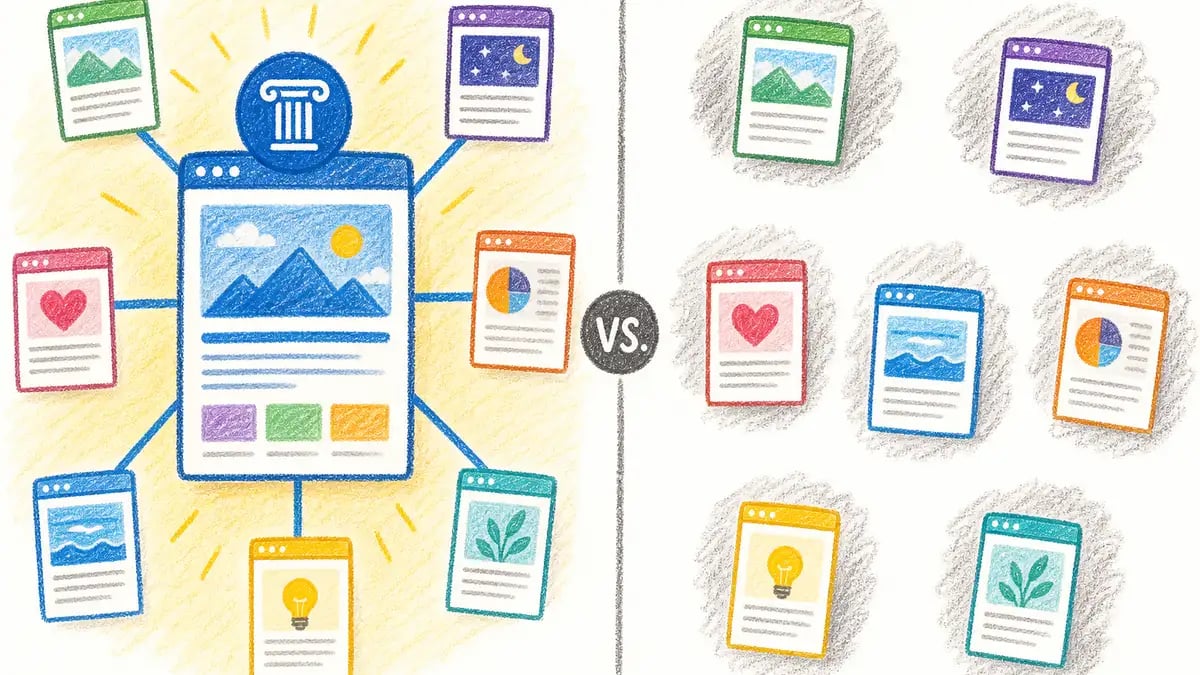
The topic cluster model places the pillar page at the centre of a network of related content. Around it sit 8–12 cluster articles, each covering one subtopic from the pillar in greater depth. Every cluster page links back to the pillar; the pillar links out to every cluster page. This bidirectional linking creates a semantic network that tells search engines your site has genuine, organised expertise on a subject.
Pillar Page
3,000–5,000 words. Covers the broad topic comprehensively. Targets the head keyword ("pillar pages"). Links to every cluster article. Acts as the topical authority hub. Updated quarterly.
Cluster Article
1,200–2,000 words. Covers one specific subtopic in depth (e.g. "how to choose pillar page topics"). Targets a long-tail keyword. Links back to the pillar and to 2–3 sibling cluster articles.
The structural significance of this model extends into AI search. According to the Yext AI Citation Study (2025), 86% of AI citations originate from sites with five or more interconnected pages on the topic, with the average cluster architecture comprising one pillar page and eight cluster articles. Bidirectional internal linking alone increases AI citation probability by 2.7×.
If you want to understand how to implement this architecture in practice—including how to set it up using HubSpot's Topics tool and content strategy feature—our guide on setting up pillar pages in HubSpot's Topics tool covers the full workflow for B2B sites.

What are the measurable benefits of pillar pages and topic clusters?
The evidence for the pillar-cluster model is consistent across multiple independent studies from 2024–2026. The benefits operate at three levels: organic traffic, ranking durability, and AI search citation—each driven by a different mechanism but all reinforced by the same underlying structure.
43%
Avg. Traffic Lift
For sites implementing topic clusters (HubSpot, 2024)
3.2×
More AI Citations
For sites with topic clusters vs single-page competitors (Yext, 2025)
2.5×
Longer Rankings
Clustered content holds rankings longer than standalone posts (HireGrowth, 2025)
86%
AI Citations Traced to Clusters
Of AI citations from sites with 5+ interconnected pages on a topic (Yext, 2025)
Sources: HubSpot Topic Clusters Research 2024; Yext AI Citation Study 2025 via Wellows; Search Engine Land / HireGrowth Analysis 2025
Content organised into clusters generates approximately 30% more organic traffic and holds rankings 2.5× longer than standalone posts, based on Search Engine Land's 2025 topic cluster guide, which synthesises HireGrowth's analysis of clustered versus non-clustered content strategies.
| Study / Source | Key Finding | Year |
|---|---|---|
| HubSpot Internal Research | 43% average organic traffic increase for sites using topic clusters; improved rankings across 300+ keywords within 12 months | 2024 |
| HireGrowth / Search Engine Land | ~30% more organic traffic and 2.5× longer ranking lifespan for clustered vs standalone content | 2025 |
| Yext AI Citation Study | 3.2× more AI citations for topic-cluster sites; bidirectional linking increases citation probability by 2.7× | 2025 |
| Portent Content Hub Case Study | 207% increase in organic sessions after implementing a cluster and hub structure | 2024 |
| Backlinko Content Research | Content over 3,000 words generates ~3× more traffic and 77.2% more backlinks than shorter pieces | 2024 |
Sources: HubSpot 2024; Search Engine Land 2025; Yext via Wellows 2025; Backlinko 2024
Want to build a topic cluster that drives measurable organic growth? See how Whitehat plans and builds content strategies for B2B companies.
Explore Our Marketing ServicesHow do you build a pillar page step by step?
Building a pillar page that performs requires a specific sequence. The most common mistake is writing the pillar first and hoping the cluster follows—the cluster architecture and the keyword mapping need to come before a single word of the pillar is written.
Choose a core topic with cluster potential
Select a broad topic that supports 10–15 subtopic articles. The right pillar topic has genuine search volume on the head term, a cluster of long-tail queries beneath it, and clear business relevance. Avoid topics so narrow they can be covered in a single post or so broad they have no natural boundary. Use keyword research to validate cluster potential before committing.
Map your cluster architecture before writing
Identify 8–12 subtopics that deserve their own dedicated articles. Each cluster article should target a specific long-tail query, answer one narrow question in depth, and link back to the pillar. Plan the bidirectional linking structure at this stage—you cannot effectively retrofit it later. Understanding topic clusters in detail will help you see the full architecture before you build.
Write the pillar page with an answer-first structure
Write 3,000–5,000 words covering the broad topic comprehensively. Open with a 40–60 word direct answer to the primary query. Structure each H2 section to open with a standalone, extractable answer (40–70 words) before expanding into detail. Include a table of contents, comparison tables, data points with source links, and a FAQ section. Each section should be comprehensible in isolation—AI systems extract and evaluate individual passages independently.
Build and publish the cluster articles
Publish each cluster article with its link back to the pillar and 2–3 cross-links to sibling cluster articles. Aim to launch the pillar and at least five cluster articles simultaneously—the Yext AI Citation Study (2025) identifies five interconnected pages as the threshold at which AI citation probability rises sharply. Below five, the cluster effect on AI search is minimal.
Measure, refresh, and expand
Track organic traffic, keyword positions, and AI citation frequency across the cluster. Refresh the pillar quarterly with updated statistics and new sections aligned to emerging queries. AI-cited content is 25.7% fresher on average than traditionally ranked content (Ahrefs / Digital Bloom, 2026), meaning regular updates directly improve citation probability. Expand the cluster as you identify new subtopic gaps from search data.

What does a pillar page need to rank in AI Overviews in 2026?
In 2026, a pillar page serves a dual mandate: ranking in traditional search results and earning citations in AI Overviews, Perplexity, and ChatGPT. The content structures that support both are increasingly aligned, but there are specific patterns that AI systems prefer when selecting passages to cite.
The Most Common Pillar Page Mistake in 2026
The mistake: Building a long "ultimate guide" that tells a narrative story and buries key definitions halfway through multiple paragraphs of context-setting.
The problem: AI systems extract individual passages, not entire articles. If a section requires the reader to have understood three prior sections to make sense of it, that section will not be extracted or cited. Every H2 on a pillar page must open with a direct, self-contained answer to the question posed in the heading—then expand into supporting evidence.
Content optimised for answer engines receives 3.5× more AI citations than content written for traditional SEO alone, according to Mentionstack research via Onely (2026). The key structural differences come down to four practices:
- Answer-first H2 sections — The first 40–70 words under each H2 answer the question posed in the heading as a standalone passage. AI systems can cite this opening without the surrounding context.
- Dense, sourced statistics — Research from Princeton University's GEO study finds that adding statistics with sources improves AI visibility by 30–41%.
- Extractable tables and comparisons — Comparison tables and data summaries are among the formats most commonly extracted by AI Overview systems. Every pillar page should include at least one.
- FAQ section with natural language questions — FAQ content captures the query fan-out that follows an AI Overview response, where users ask follow-up questions. Each FAQ answer should be 30–50 words: direct answer first, context second.
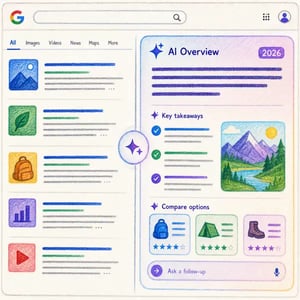
The technical prerequisites matter too. Pages with a Largest Contentful Paint above 4 seconds are approximately 72% less likely to be cited in AI Overviews, according to Onely's 2026 analysis of AI citation signals. Core Web Vitals and fast server response times are now as relevant to AI citation as they are to traditional ranking.
What This Means for Your Content Strategy
Building for AI citations and building for traditional search are now the same task. The answer-first structure, dense evidence, and bidirectional cluster linking that AI systems prefer are the same signals that correlate with strong traditional rankings. A pillar page built to the 2026 standard serves both audiences simultaneously—and Whitehat's AEO refresh data shows that this structural upgrade alone can lift a page from position 18 to position 9 within 28 days on high-impression queries.
How does a pillar page differ from a standard blog post?
The distinction between a pillar page and a standard blog post is often described in terms of length, but length is a symptom, not the cause. The real difference is architectural role, scope, and internal linking function. The table below captures the key differences as they apply in 2026.
| Dimension | Pillar Page | Standard Blog Post |
|---|---|---|
| Purpose | Define and own a broad topic; anchor the cluster; primary citation hub | Answer a specific question or angle; support the pillar; capture long-tail traffic |
| Length | 3,000–5,000 words | 1,200–2,000 words |
| Keyword target | Head term (e.g. "pillar pages") | Long-tail (e.g. "how to choose pillar page topics") |
| Internal links | Links to every cluster article; navigation hub | Links back to pillar; links to 2–3 sibling articles |
| Update cadence | Quarterly; expands as cluster grows | When subtopic changes or performance drops |
| AI citation role | Primary citation hub; highest citation surface area | Supports citation on its specific subtopic only |
Sources: Siteimprove 2025; Digital Applied 2026
One consequence of the distinction is worth emphasising: a standard blog post, even a long one, cannot perform the pillar function simply by adding more words. What makes a pillar page a pillar is that it serves as the canonical reference for its topic cluster—it is the page other content in the cluster links back to, and the page search engines and AI systems treat as the authoritative entry point for the topic. That role is conferred by architecture, not word count.
If you are auditing existing content to identify pillar candidates, look for pages that already rank across a range of related queries and attract a diverse mix of long-tail traffic. These are often naturally performing pillar pages that have not been formally architected as such—they can be upgraded with improved internal linking, added structure, and cluster development without a complete rewrite. For a deeper look at SEO fundamentals and how content structure fits into a broader organic strategy, our SEO basics guide covers the underlying principles.
Frequently asked questions about pillar pages
What is the difference between a pillar page and a blog post?
A pillar page covers a broad topic comprehensively (3,000–5,000 words) and acts as the central hub for a cluster of related articles. A standard blog post targets a single long-tail keyword and covers one narrow angle (1,200–2,000 words). The key difference is architectural role: the pillar is the hub that other content links back to; the blog post is a spoke that links up to the pillar.
How long should a pillar page be?
For competitive B2B topics, aim for 3,000–5,000 words. Research by Siteimprove (2025) and Backlinko both identify 3,000–5,000 words as the effective range for pillar pages on competitive topics, while Backlinko data shows content over 3,000 words generates 3× more traffic and 77.2% more backlinks than shorter pieces. Depth and coverage matter more than raw word count—a 3,000-word page covering the topic thoroughly will outperform a 5,000-word page padded with repetition.
How many cluster pages should a pillar page have?
Start with 8–12 cluster articles per pillar. This range appears consistently across the most recent guidance: Siteimprove recommends 8–12, the Yext AI Citation Study found the average AI-citation-generating cluster has one pillar plus eight cluster pages, and Search Engine Land advises locking 10–15 spokes before scaling further. Five or more interconnected pages is the minimum threshold for the cluster's AI citation effect to activate.
What does a pillar page need to earn AI Overview citations?
A pillar page needs: a direct answer in the first 40–70 words of each H2 section; dense, sourced statistics (every 150–200 words); at least one comparison table; a FAQ section with natural language questions; and a surrounding cluster of 5+ interconnected pages. Pages with LCP below 4 seconds and a well-maintained cluster earn citations significantly more often, per Onely's 2026 analysis of AI search citation signals.
Can an existing blog post become a pillar page?
Yes, if it already ranks across a range of related queries and has good topical coverage, it can be upgraded into a pillar. The process involves expanding to 3,000–5,000 words, restructuring with answer-first H2 sections, building the surrounding cluster architecture, and adding bidirectional internal links. The existing authority and backlinks of a well-performing post make it a stronger pillar candidate than starting from scratch.
How often should a pillar page be updated?
Quarterly at minimum. AI-cited content is 25.7% fresher on average than traditionally ranked content, according to Ahrefs data cited in the 2026 Digital Bloom AI Citation Report. For fast-moving topics, update monthly. At each refresh, prioritise updating statistics, adding new sections for emerging queries, and expanding the cluster with new articles. The freshness signal has a direct, measurable effect on AI citation probability.
What is the ideal internal linking structure for a pillar page?
Every cluster article should link back to the pillar, and the pillar should link to every cluster article. This bidirectional structure is what makes the cluster function as a semantic network. Beyond the cluster, the pillar should also receive links from high-authority related pages on your site (such as service pages), and ideally from 2–3 sibling cluster articles in adjacent topic groups. The Yext 2025 study found bidirectional linking increases AI citation probability by 2.7×.
Is a pillar page the same as a cornerstone content page?
Pillar page and cornerstone content are often used interchangeably, but there is a subtle difference in origin. Cornerstone content (a term popularised by Yoast) refers to your most important pages that you want to rank for core keywords—it is a content hierarchy concept. Pillar page (popularised by HubSpot) is specifically the hub of a topic cluster, defined by its internal linking architecture. In practice, your pillar pages and your cornerstone content are usually the same pages.
Ready to Build a Topic Cluster That Drives Measurable Organic Growth?
Whitehat builds content strategies and pillar-cluster architectures for B2B companies across the UK—including keyword research, pillar page creation, cluster article production, and AI search optimisation. Get a free audit and see where your site's biggest opportunities lie.
Clwyd Probert
Founder, Whitehat SEO
Clwyd Probert is the founder of Whitehat, a London-based SEO and inbound marketing agency and HubSpot Platinum Partner since 2016. He has led organic growth strategy for B2B clients across professional services, technology, and financial sectors.
Sources: HubSpot Topic Cluster Research 2024; Yext AI Citation Study 2025 via Wellows; Search Engine Land Topic Cluster Guide 2025; Onely AI Search Visibility Guide 2026; Backlinko Content Research 2024; Siteimprove Pillar Page Design 2025; Digital Bloom AI Citation Report 2026