
HubSpot & Social Media Marketing
For B2B companies already invested in the HubSpot ecosystem, adding social capabilities requires no additional spend and delivers attribution clarity that standalone tools struggle to match. For companies considering HubSpot specifically for social media, the £890/month minimum investment only makes sense if you'll also use email marketing, landing pages, automation, and CRM features.
HubSpot Social Media Tools: The Complete Guide for B2B Marketers
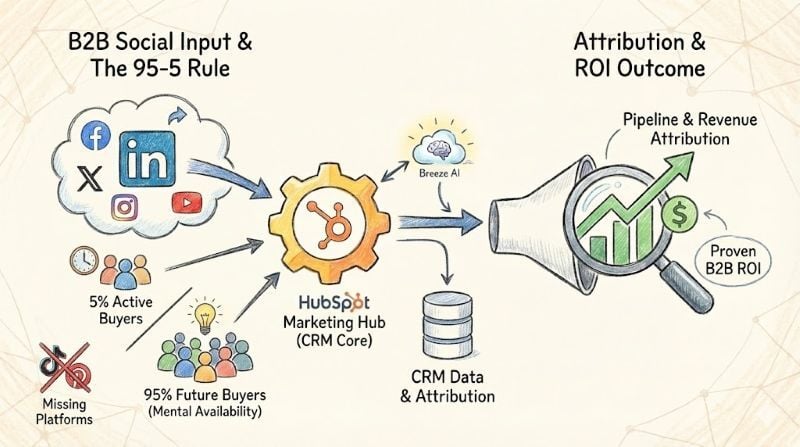
HubSpot's social media tools are available exclusively in Marketing Hub Professional (£890/month) and Enterprise (£3,600/month) tiers, supporting Facebook, Instagram, LinkedIn, X/Twitter, and YouTube—but notably lacking TikTok and Pinterest integration. The platform's standout strength lies in its CRM integration, allowing B2B marketers to track exactly which social posts generate leads and revenue. With LinkedIn generating 80% of all B2B social media leads, according to LinkedIn's 2024 research, HubSpot's native attribution capabilities make it particularly valuable for companies already invested in the HubSpot ecosystem.
What Social Media Features Does HubSpot Include?
HubSpot Marketing Hub provides a comprehensive social media management toolkit designed specifically for B2B marketers who need to prove ROI. Unlike standalone social tools, every interaction feeds directly into your CRM, creating a clear line from social engagement to revenue.
Core Publishing and Scheduling Capabilities
HubSpot's social publishing tools support scheduling up to three years in advance, with bulk upload capabilities for up to 200 posts via CSV. The "Publish like a human" feature staggers post delivery within a 10-minute window, making automated content appear more natural to platform algorithms.
Marketing Hub Professional accounts can connect up to 50 social accounts, whilst Enterprise users can manage up to 300—making HubSpot suitable for multi-brand organisations and agencies managing client portfolios.
Social Inbox and Engagement Management
The unified social inbox consolidates mentions, comments, and direct messages across all connected platforms. For B2B companies, the real power lies in the CRM integration: when a prospect engages with your social content, that interaction automatically appears on their contact record. This gives sales teams visibility into how warm a lead might be before their first conversation.
Instagram Direct Messages management became available in 2024 for Professional and Enterprise tiers, addressing a gap that had frustrated many social media managers.
Attribution and ROI Tracking
HubSpot's attribution reporting represents the platform's strongest competitive advantage. Three attribution report types are available: Contact Create (which social interactions created new contacts), Deal Create (Enterprise only), and Revenue Attribution (Enterprise only). For B2B marketers who struggle to prove social media's contribution to pipeline, this native integration eliminates the spreadsheet gymnastics required with standalone tools.
According to HubSpot's 2024 ROI research, businesses using the platform report 505% ROI over three years—though this figure encompasses the entire Marketing Hub, not social features alone. The ability to track a lead from their first LinkedIn engagement through to closed revenue makes a compelling case for HubSpot onboarding investment.
What Is Breeze AI and How Does It Help with Social Media?
Breeze AI is HubSpot's artificial intelligence layer, launched at INBOUND 2024 in September. The Breeze Social Media Agent analyses your past social performance, business details, brand voice, industry, and audience to generate post suggestions tailored to each platform. It recommends optimal posting times based on when your specific audience is most active—not generic best practices.
The system operates with a human-in-the-loop approach: Breeze suggests content and scheduling, but you review and approve everything before publication. This addresses concerns about AI-generated content sounding generic or off-brand whilst still delivering meaningful time savings.
Breeze AI Limitations to Consider
Current Breeze capabilities focus on Facebook, LinkedIn, X, and Instagram—mirroring HubSpot's broader platform support. The AI is optimised for English only as of early 2025, which may limit its usefulness for companies operating in non-English markets or running multilingual campaigns.
The Content Remix feature, also part of Breeze, transforms single content assets into multiple formats including social posts. For content teams struggling to repurpose blog posts and webinars across channels, this can significantly reduce production time. To understand how AI is reshaping marketing workflows more broadly, our guide to using AI with HubSpot provides additional context.
Industry research from the Content Marketing Institute shows 85% of B2B marketers now use generative AI tools—a figure that's increased 20% year-over-year. HubSpot's native AI integration means you don't need separate subscriptions to ChatGPT, Jasper, or other writing assistants for basic social content creation.
HubSpot Social Media Pricing and Tier Comparison
Social media features are not available in HubSpot Free or Starter tiers. This is a common source of frustration for companies who adopt HubSpot CRM expecting social capabilities, only to discover they need a significant upgrade.
| Tier | Monthly Cost | Social Accounts | Key Social Features |
|---|---|---|---|
| Free / Starter | £0–£45 | — | No social media features |
| Professional | £890/month | Up to 50 | Full publishing, social inbox, Breeze AI, contact attribution |
| Enterprise | £3,600/month | Up to 300 | All Professional features + deal & revenue attribution |
HubSpot transitioned to seat-based pricing in March 2024. The Professional tier includes 3 seats and 2,000 marketing contacts; additional seats and contacts increase costs. One-time onboarding fees apply: £3,000 for Professional and £7,000 for Enterprise.
For companies already using Marketing Hub Professional for email, landing pages, and automation, social media features add no incremental cost—they're included. The pricing question becomes more nuanced when evaluating whether to upgrade specifically for social capabilities, or whether a dedicated tool like Hootsuite or Buffer provides better value.
Supported Platforms and Limitations
HubSpot's platform support reflects its B2B focus—strong on LinkedIn and professional networks, weaker on consumer-oriented and visual platforms.
| Platform | Status | Key Limitations |
|---|---|---|
| ✓ Supported | Pages only; re-authentication required every 90 days; no Stories support | |
| ✓ Supported | Business accounts only; must link to Facebook Page; Stories cannot include links, GIFs, or stickers | |
| ✓ Supported | All LinkedIn data deleted after 1 year (LinkedIn policy) | |
| X (Twitter) | ✓ Supported | Full functionality |
| YouTube | ✓ Supported | Reporting focus; limited publishing capabilities |
| TikTok | ✗ Not Supported | Major gap for B2C and younger B2B audiences |
| ✗ Not Supported | Problematic for visual-heavy industries | |
| Threads | ✗ Not Supported | Meta's newer platform not yet integrated |
Recent Platform Updates
Instagram Reels scheduling and tracking became available in 2024, addressing a gap that had pushed many social teams toward Later or native posting. Instagram Stories moved from private beta to production in August 2024, though functionality remains limited compared to native tools—you cannot add links, GIFs, or stickers when posting through HubSpot.
The TikTok and Pinterest gaps deserve serious consideration. If your target audience skews younger or your business relies heavily on visual discovery, HubSpot's social tools may need supplementing with dedicated platforms.
Why LinkedIn Matters Most for B2B Social Media
LinkedIn generates 80% of all B2B leads from social media, according to LinkedIn's own 2024 research. For B2B marketers evaluating HubSpot's social tools, this statistic reframes the entire conversation—the platform gaps (TikTok, Pinterest) become less relevant when your primary objective is B2B lead generation.
LinkedIn Best Practices Within HubSpot
Buffer's research shows that posting 11+ times per week on LinkedIn generates 3x more engagements than lower frequencies. The platform's algorithm now emphasises niche authority and meaningful engagement over viral content—making consistent, expert-level posting more valuable than occasional home runs.
Multi-image posts achieve the highest engagement rate at 6.60%, followed by polls which create what researchers call "viral feedback loops." Native document posts (PDF carousels) perform strongly for practical, educational content. Posts with 1-3 hashtags generate the highest impressions; more than that can actually hurt reach.
For B2B companies, LinkedIn's importance connects directly to broader inbound marketing strategy. Social media works best when integrated with content marketing, SEO, and lead nurturing—exactly the workflows HubSpot is designed to support.
HubSpot vs Hootsuite vs Buffer vs Sprout Social
The right tool depends on your existing tech stack, budget, and whether attribution or publishing breadth matters more to your organisation.
| Capability | HubSpot | Hootsuite | Sprout Social | Buffer |
|---|---|---|---|---|
| CRM Integration | ★★★★★ | ★★☆☆☆ | ★★★☆☆ | ★☆☆☆☆ |
| Social Listening | ★★☆☆☆ | ★★★★★ | ★★★★☆ | ☆☆☆☆☆ |
| Platform Coverage | ★★★☆☆ | ★★★★★ | ★★★★☆ | ★★★★☆ |
| Marketing Attribution | ★★★★★ | ★★☆☆☆ | ★★☆☆☆ | ★☆☆☆☆ |
| Ease of Use | ★★★★☆ | ★★★★☆ | ★★★★☆ | ★★★★★ |
| Starting Price | £890/mo | £89/mo | £199/seat/mo | £12/mo |
When HubSpot Native Social Is Sufficient
HubSpot's social tools make sense when you've already invested in Marketing Hub Professional or Enterprise for other features (email, landing pages, automation, CRM). The marginal cost of social is zero—it's included. For B2B companies prioritising lead generation and sales attribution over publishing volume, the CRM integration provides value that standalone tools cannot match.
If you're managing 3-5 accounts on core platforms and don't need TikTok or Pinterest, HubSpot handles the workload competently. The single source of truth for all marketing data—from first social touch to closed revenue—simplifies reporting and proves ROI to stakeholders.
When to Add Third-Party Tools
Consider supplementing HubSpot if you need TikTok or Pinterest management, require advanced social listening capabilities, manage many accounts (agencies, franchises), need sophisticated approval workflows, or face budget constraints that prevent Marketing Hub Professional investment.
Hybrid approaches work well: HubSpot for attribution and CRM integration, plus a specialist tool for publishing breadth or listening depth. Common pairings include HubSpot + Hootsuite (for social listening), HubSpot + Later (for Instagram and Pinterest), or HubSpot + Buffer (for cost-conscious teams wanting simple scheduling).
Best Practices for HubSpot Social Media Management
Getting value from HubSpot's social tools requires intentional setup and consistent processes. These practices separate teams that view social as a checkbox from those generating measurable pipeline contribution.
Configure Attribution from Day One
Before publishing your first post, ensure tracking URLs are set up correctly. Every social post should include UTM parameters so HubSpot can attribute conversions accurately. Associate all posts with campaigns to see which themes and messages drive results.
For B2B companies with longer sales cycles, U-shaped or linear attribution models often provide more accurate pictures than first-touch or last-touch. Someone who discovered you through a LinkedIn post, then visited your site six times before requesting a demo, deserves credit at multiple points. Understanding HubSpot CRM capabilities helps you configure these models effectively.
Use AI-Suggested Timing, Then Test
Breeze AI analyses your specific audience engagement patterns to suggest optimal posting times. This beats generic advice (Tuesday-Thursday, 9am-2pm) because it reflects your actual followers' behaviour. However, treat suggestions as starting points—run your own experiments to validate.
Enable the "Publish like a human" feature to make scheduled content appear more organic. The slight randomisation within a 10-minute window prevents the robotic precision that can trigger platform algorithms to reduce reach.
Maintain Posting Consistency
For LinkedIn specifically, aim for minimum 3-5 posts per week. Buffer's research shows 11+ weekly posts generate 3x more engagements, but quality shouldn't suffer for quantity. Better to post three genuinely valuable insights than eleven pieces of filler content.
Use HubSpot's bulk scheduling (up to 200 posts via CSV) to batch content creation. Dedicate one session per week or month to creating and scheduling, rather than trying to publish ad hoc. This approach also makes social media optimisation easier to manage systematically.
Connect Social to Your CRM Workflows
The real power of HubSpot social lies in CRM integration. Set up workflows that alert sales when a target account engages with social content. Create lists of contacts who've interacted with specific campaigns. Use social engagement as lead scoring criteria.
Sales professionals with high Social Selling Index scores are 51% more likely to achieve quotas, according to LinkedIn. When your sales team can see which prospects engaged with your social content before a call, they're better prepared to have relevant conversations.
Frequently Asked Questions
Does HubSpot support TikTok?
No. HubSpot does not currently support TikTok integration for publishing or analytics. If TikTok is central to your social strategy, you'll need a third-party tool like Hootsuite, Later, or Sprout Social alongside HubSpot—or manage TikTok natively through the platform itself.
Can you schedule Instagram Reels in HubSpot?
Yes. Instagram Reels scheduling and tracking became available in 2024. You can publish Reels directly from HubSpot and track their performance within the platform. Instagram Stories are also supported, though with limitations—you cannot add links, GIFs, or stickers when posting through HubSpot.
Is HubSpot social media included in the Starter tier?
No. Social media features require Marketing Hub Professional (£890/month) or Enterprise (£3,600/month). The Free and Starter tiers do not include any social media publishing, scheduling, or analytics capabilities. This catches many companies off-guard when evaluating HubSpot.
Is HubSpot better than Hootsuite for social media?
It depends on your priorities. HubSpot excels at CRM integration and marketing attribution—tracking which social posts generate leads and revenue. Hootsuite offers broader platform coverage (including TikTok), superior social listening, and lower entry-level pricing. For B2B companies already using HubSpot's CRM, native social tools provide tighter integration. For teams prioritising publishing breadth or advanced listening, Hootsuite may be the better choice.
How does HubSpot's Breeze AI Social Media Agent work?
Breeze AI analyses your past social performance, business details, brand voice, industry, and audience to generate post suggestions. It recommends optimal posting days and times based on your specific audience's engagement patterns. All content requires human review before publishing—you approve, edit, or reject AI suggestions rather than letting them post automatically.
How do I track social media ROI in HubSpot?
Connect your social accounts, ensure all posts use tracked URLs with UTM parameters, and associate posts with campaigns. HubSpot offers three attribution report types: Contact Create (all tiers), Deal Create (Enterprise only), and Revenue Attribution (Enterprise only). For B2B with longer sales cycles, consider U-shaped or linear attribution models rather than first-touch or last-touch.
Making the Right Choice for Your Business
HubSpot's social media tools won't win awards for platform breadth or social listening sophistication. That's not what they're designed to do. Their value proposition centres on one thing: proving that social media contributes to revenue through native CRM integration and multi-touch attribution.
The 95-5 rule applies here as with all marketing: only 5% of your target market is actively buying at any given time. Social media's job isn't just converting the 5%—it's building mental availability with the 95% who'll buy later. HubSpot helps you measure the first; great social strategy addresses the second.
References & Sources
- HubSpot Product and Services Catalog – Official tier-by-tier feature breakdown and pricing
- HubSpot Breeze Social Media Agent – AI-powered social media features documentation
- HubSpot Knowledge Base – Social Accounts – Platform connection guide and limitations
- Sprout Social – LinkedIn Statistics 2025 – B2B platform performance data
- LinkedIn B2B Benchmark 2024 Report – Official LinkedIn marketing research
- Content Marketing Institute – B2B Content Marketing Research 2025 – Industry statistics and trends
- Buffer – LinkedIn Marketing Guide – Posting frequency and engagement research