
HubSpot & Content Strategy
For Marketing Directors at B2B SaaS companies and RevOps teams running HubSpot, Content Hub eliminates the fragmentation of managing separate CMS, marketing automation, and analytics tools. If you're evaluating whether to migrate from WordPress, build in Webflow, or consolidate onto HubSpot's platform, this guide covers everything you need to make an informed decision.
HubSpot Content Hub in 2026: The Complete Guide for UK B2B Marketers
Everything you need to know about pricing, Breeze AI features, and whether Content Hub is the right choice for your organisation.
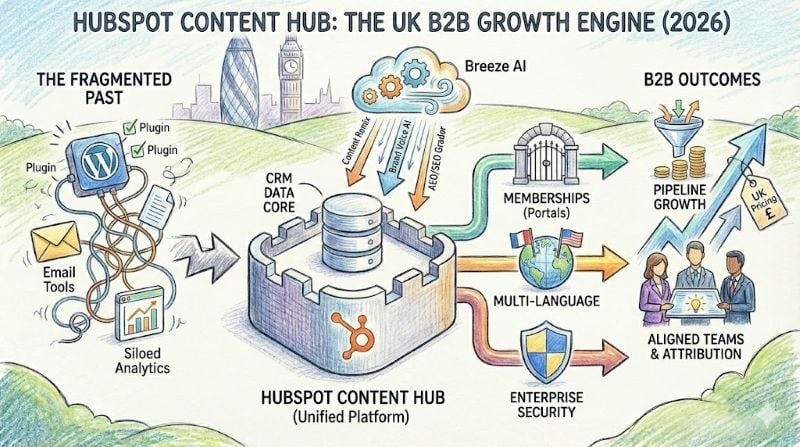
HubSpot Content Hub is a Gartner-recognised Leader in content marketing platforms, making it the strongest choice for UK B2B companies already using HubSpot CRM in 2026. The platform combines AI-powered content creation through Breeze, native CRM integration, and emerging Answer Engine Optimisation tools—with UK pricing starting at approximately £360–400 per month for Professional tier.
Breeze AI has fundamentally changed content creation
HubSpot's September 2024 INBOUND conference introduced Breeze, the unified AI suite that now powers Content Hub's most distinctive capabilities. For B2B marketers struggling with content production bottlenecks, these tools represent a genuine step-change in efficiency.
Content Remix stands out as HubSpot's most popular AI feature. The tool transforms a single blog post into social posts, emails, landing pages, and podcast scripts—all maintaining your brand's consistent tone. Content Remix accepts inputs ranging from PDFs and videos to existing web pages, outputting up to six formats simultaneously.
Brand Voice AI learns your organisation's distinctive tone from a minimum 500-word writing sample, then applies this voice consistently across all AI-generated content. The Spring 2025 update expanded this with "Brand Identity," which automatically extracts tone, visual style, ICP characteristics, and competitive positioning from your existing content.
The AI Blog Writer now integrates Semrush data for SEO-informed topic suggestions and automatic internal linking. HubSpot reports customers generated 300,000 AI images within four months of launching the Stability AI-powered image generator—150% above initial capacity projections.
Whitehat delivers HubSpot onboarding services that include Breeze AI configuration, ensuring your team captures maximum value from these content tools from day one.
Memberships unlock premium content strategies for B2B
Content Hub Professional includes membership functionality with two access groups, enabling password-protected resource centres, partner portals, and tiered content libraries tied directly to CRM data. Unlike basic gated content, memberships create individual login credentials with personalised experiences based on purchase history, company size, or lifecycle stage.
For UK B2B organisations with channel partners, certification programmes, or customer success resources, this eliminates the need for separate portal platforms. Enterprise tier removes the access group limit and adds SSO support for organisations with existing identity management.
Multi-language content management supports 60+ languages with DeepL-powered translation via Breeze AI. The platform automatically handles URL structures (adding language codes), hreflang tags for SEO, and XML sitemap updates—administrative tasks that consume significant time on WordPress implementations.
UK pricing structure demands tier-by-tier evaluation
HubSpot bills UK customers directly in GBP with 20% VAT applied. The seat-based pricing model introduced in March 2024 affects total cost calculations significantly.
| Tier | Monthly Cost (GBP) | Core Seats | Key Capabilities |
|---|---|---|---|
| Free | £0 | 1-2 | Basic CMS, 30 landing pages, HubSpot branding |
| Starter | ~£15-20/seat | Per seat | Remove branding, custom domain, basic SEO |
| Professional | ~£360-400 base | 3 included | AI tools, topic clusters, memberships, 300 workflows |
| Enterprise | ~£1,200+ base | 5 included | Multi-domain, content partitioning, sandbox, SSO |
The Marketing+ bundle combines Marketing Hub and Content Hub, offering unified content-to-lead-to-customer workflows. Professional tier bundles typically run £880–960 per month with 2,000 marketing contacts included—representing 10-25% savings versus purchasing separately.
Professional tier requires annual commitment with monthly billing; Enterprise requires annual commitment paid upfront. Unlike Marketing Hub's mandatory £2,400 Professional onboarding requirement, Content Hub has no mandatory onboarding fees.
For organisations already committed to HubSpot's CRM ecosystem, the bundled approach often represents the most cost-effective path. Budget approximately £5,000–15,000 annually for Professional tier depending on seat count and bundles.
Content Hub outperforms WordPress for marketing-led organisations
WordPress powers 43% of all websites, but HubSpot Content Hub addresses its fundamental weakness for B2B marketers: the disconnection between content and customer data. HubSpot users report 25% better content conversion rates versus WordPress, attributed to native personalisation tied to CRM records.
The total cost of ownership comparison frequently surprises organisations focused on WordPress's free core. A properly secured, well-performing WordPress installation with premium hosting, security plugins, SEO tools (Yoast + Semrush), and developer maintenance typically runs £200–500 per month—approaching Content Hub Professional pricing while lacking CRM integration.
Security represents the starkest difference. HubSpot's managed infrastructure includes enterprise-grade WAF blocking 2+ million malicious requests daily, automatic SSL provisioning, DDoS protection, and 24/7 security monitoring. WordPress's plugin ecosystem creates ongoing vulnerability management requirements—35% of WordPress security breaches trace to outdated plugins.
Where WordPress wins decisively:
Design flexibility remains unlimited with full PHP/CSS/JavaScript access, the developer talent pool is substantially larger, and e-commerce via WooCommerce offers deeper capabilities than HubSpot's Commerce Hub for complex product catalogues.
Our website audit service can assess whether your current WordPress setup is costing more than a HubSpot migration would deliver in efficiency gains.
When Webflow makes more sense
For brand-obsessed B2B companies prioritising visual distinctiveness, Webflow delivers pixel-perfect design control that Content Hub cannot match. G2's customisation scores reflect this gap: Webflow 9.1/10 versus HubSpot 8.0/10. One agency reports building websites "5-7x faster in Webflow than HubSpot" when design requirements drive the project.
Content Hub counters with marketing automation advantages Webflow lacks. Native forms with progressive profiling, A/B testing, and attribution reporting integrate seamlessly with sales pipelines. G2's email integration score tells this story: HubSpot 8.8 versus Webflow 6.6.
Many sophisticated B2B organisations adopt a hybrid approach: building their primary marketing site in Webflow whilst running HubSpot CRM and Marketing Hub for lead management—connecting the two via integration. This captures Webflow's design excellence whilst retaining HubSpot's marketing automation strength, though at the cost of platform fragmentation that Content Hub specifically addresses.
Real B2B results demonstrate measurable pipeline impact
The evidence for Content Hub's effectiveness comes from documented implementations across mid-market B2B organisations:
Kelly Services migrated all websites to Content Hub, achieving +32% site users, +26% sessions, and +60% conversion increase within eight months. Their implementation unified five business units across Marketing Hub and Content Hub, onboarding 300+ Sales Hub users across 15 teams in three months.
D-Tools (B2B SaaS serving 7,000 companies) achieved 258% increase in organic visitors and 162% session growth after migrating from Marketo to HubSpot Marketing + CMS Enterprise, reaching #1 rankings for high-value industry keywords within 12 months.
Consafe Logistics recorded 415% conversion growth and won HubSpot's 2023 Impact Award following their Content Hub website redesign.
Across HubSpot's 238,000+ customers globally, the platform reports average improvements of 129% more leads and 36% more deals closed after one year of implementation.
Common implementation challenges centre on data migration quality and team adoption. Partners consistently recommend treating migration as a content optimisation opportunity rather than a lift-and-shift exercise. Typical migration timelines run 2-12 weeks depending on site complexity, with partner-assisted complex migrations starting around £10,000.
Whitehat's HubSpot onboarding packages are designed to avoid these common pitfalls, ensuring your team obtains value quickly whilst establishing foundations for long-term success.
Answer Engine Optimisation positions Content Hub for AI search
HubSpot's AEO Grader (free tool) analyses brand visibility across ChatGPT, Perplexity, and Google Gemini—providing competitive benchmarking, sentiment analysis, and actionable optimisation recommendations. This capability reflects HubSpot's recognition that AI-generated search answers increasingly mediate the buyer research journey.
Content Hub Professional includes AI Search Readiness scoring for topics, gap analysis identifying content opportunities for AI engine optimisation, and one-click content generation for recommended topics. The platform's native structured data support—including automatic BlogPosting schema for all blog content—helps AI engines accurately understand and cite your content.
For UK B2B marketers, technical SEO capabilities prove solid though not exceptional. Built-in SEO recommendations prioritise fixes by impact and difficulty, Google Search Console integration displays impressions, clicks, and position data alongside content metrics, and the Spring 2025 Site Speed Dashboard shows Core Web Vitals trends with actionable recommendations.
Important technical consideration:
The platform's JavaScript overhead from CTAs, tracking, and chat features (often 500KB+) can challenge Core Web Vitals optimisation. Performance-critical sites benefit from custom theme development rather than marketplace templates optimised for flexibility over speed.
Schema markup beyond BlogPosting requires manual implementation via HubL templates or page-level settings—less automated than Yoast SEO's WordPress approach but functional for teams with technical resources.
Learn more about preparing your content for AI search visibility in our AI consultancy and implementation services, or explore our SEO services for comprehensive organic search strategy.
Expert consensus validates the platform for mid-market B2B
Gartner named HubSpot a Leader in the March 2025 Content Marketing Platforms Magic Quadrant—entering as a leader despite launching Content Hub only in April 2024. The analyst firm specifically praised HubSpot's "access to customer data in the integrated CRM" as differentiation from competitors, noting the platform's "market responsiveness" in replacing fragmented point solutions.
G2, Capterra, and TrustRadius reviews consistently rate Content Hub 4.4-4.5/5 stars, with 232 mentions of "ease of use" against 52 mentions of "limited customisation" in G2's review analysis. The platform serves marketing-led organisations well; developers and highly design-focused teams consistently cite template constraints requiring HubSpot specialist support.
As one HubSpot Elite Partner notes: "When I first became a HubSpot partner, CMS Hub was the one offering I struggled to champion... The landscape has dramatically shifted. Today, HubSpot has surpassed industry giants like Adobe, Contently, and Sitecore by delivering unmatched ease of use."
Is Content Hub right for your organisation?
Content Hub delivers its strongest value proposition for UK B2B companies already using or committing to HubSpot CRM. The unified platform eliminates data silos, enables genuine content personalisation, and provides attribution reporting from first touch through closed-won revenue.
Content Hub suits:
- Marketing Directors seeking autonomy from developer bottlenecks
- RevOps Managers wanting unified reporting across marketing and sales touchpoints
- Business owners frustrated with WordPress security maintenance and plugin complexity
- Organisations already invested in HubSpot CRM seeking platform consolidation
Content Hub is a less compelling choice for:
- Design-first brands requiring pixel-perfect visual control (consider Webflow)
- Budget-constrained startups prioritising lowest possible cost (WordPress with careful management)
- Organisations needing multi-channel content delivery across apps and IoT (headless CMS)
Honest limitations include:
- Template constraints requiring specialist developers for advanced designs
- Pricing that escalates with team size and feature requirements
- Core Web Vitals optimisation challenges from inherent JavaScript overhead
For Whitehat's B2B SaaS clients targeting 50-250 employees, Content Hub Professional or Marketing+ bundle typically represents the sweet spot—mature enough for enterprise content operations, affordable enough for growth-stage investment, and sufficiently integrated to eliminate the MarTech sprawl that fragments marketing effectiveness.
Frequently asked questions
How much does HubSpot Content Hub cost in the UK?
HubSpot Content Hub Professional costs approximately £360-400 per month in the UK, billed in GBP with 20% VAT. Starter tier begins at £15-20 per seat monthly. Enterprise tier starts around £1,200 per month. The Marketing+ bundle combining Marketing Hub and Content Hub runs £880-960 monthly.
Is HubSpot Content Hub better than WordPress for B2B?
HubSpot Content Hub outperforms WordPress for marketing-led B2B organisations due to native CRM integration, built-in security, and marketing automation. HubSpot users report 25% better conversion rates. However, WordPress offers superior design flexibility and a larger developer talent pool for complex custom requirements.
What is Breeze AI in HubSpot Content Hub?
Breeze is HubSpot's unified AI suite launched at INBOUND 2024. It includes Content Remix for transforming single pieces into multi-format campaigns, Brand Voice AI for consistent tone across all content, and AI Blog Writer with Semrush integration for SEO-informed content creation. Breeze Agents automate content, social media, prospecting, and customer service tasks.
Does HubSpot Content Hub support Answer Engine Optimisation (AEO)?
Yes, HubSpot Content Hub includes AEO capabilities. The free AEO Grader tool analyses brand visibility across ChatGPT, Perplexity, and Google Gemini. Content Hub Professional provides AI Search Readiness scoring, gap analysis, and automatic BlogPosting schema. However, advanced schema markup requires manual implementation via HubL templates.
How long does it take to migrate to HubSpot Content Hub?
Typical migration timelines range from 2-12 weeks depending on site complexity, content volume, and integration requirements. Partner-assisted complex migrations typically start around £10,000. The most successful migrations treat the process as a content optimisation opportunity rather than a direct lift-and-shift.
Ready to explore HubSpot Content Hub?
Whitehat is a HubSpot Diamond Partner with certified trainers. We'll help you evaluate whether Content Hub fits your needs and get maximum value from the platform.
Book a discovery callReferences and sources
- HubSpot named a Leader in the 2025 Gartner Magic Quadrant for B2B Marketing Automation Platforms – HubSpot Company News
- Gartner Magic Quadrant for Content Marketing Platforms 2025 – HubSpot
- HubSpot Launches New AI, Breeze, Plus Hundreds of Product Updates at INBOUND 2024 – HubSpot Investor Relations
- Content Marketing Software for Businesses of Every Size – HubSpot Products
- HubSpot Content Hub Pricing 2025 – G2
- Why HubSpot's Content Hub is a Top Content Marketing Platform: Insights from Gartner's Magic Quadrant – Lake One