
Technical SEO
Only 10% of website migrations actually improve SEO performance. The remaining 90% either maintain performance (at best) or suffer traffic losses ranging from temporary setbacks to permanent devastation. The difference comes down to one factor: whether SEO is treated as integral to the migration or bolted on as an afterthought.
Website Migration SEO: The Complete 2026 Guide to Preserving Rankings
How to execute a site migration that protects your organic traffic—and why most businesses get it catastrophically wrong.
Website migration SEO is the process of preserving your search rankings and organic traffic when making significant changes to your site—such as moving domains, changing platforms, or restructuring URLs. Research from Search Engine Journal's 2024 study of 892 domain migrations found the average recovery time is 523 days, with 17% of sites never recovering. However, properly executed migrations by experienced SEO teams typically recover within 30–60 days, with some sites exceeding pre-migration performance within weeks.
Why most website migrations fail (and how to avoid becoming a statistic)
Google's official migration documentation emphasises a principle that many businesses ignore: plan your changes one after another, not everything simultaneously. Separating your domain change from your redesign from your URL restructure gives you the ability to isolate variables and troubleshoot issues when they arise. Combining everything into a single "big bang" migration is the most common cause of catastrophic failure.
The critical differentiator between successful and failed migrations is redirect implementation. Google has confirmed that 301 and 302 redirects don't cause PageRank loss—a persistent myth finally debunked. However, redirect implementation errors remain the primary cause of migration failures. One large retailer that dismissed redirect mapping as "too complex" during a £7.6 million redesign lost approximately £3.8 million in first-month revenue from organic traffic collapse.
| Migration Type | Expected Recovery | Temporary Drop |
|---|---|---|
| HTTP to HTTPS | 2–4 weeks | 5–15% |
| Design refresh (same URLs) | 1–2 weeks | Minimal |
| CMS platform change | 4–8 weeks | 10–30% |
| Domain migration | 6–18 months | 40–70% |
Pre-migration audit requirements that protect rankings
Your pre-migration SEO audit establishes the baseline against which recovery is measured. Export everything before touching your live site—there's no going back once migration begins. A thorough website audit should document both technical infrastructure and performance metrics.
Technical inventory to document
Complete URL crawl using Screaming Frog or Sitebulb (including images, PDFs, and all resource types) forms the foundation of your audit. Document your current robots.txt directives, canonical tag implementations, and all structured data markup. Record your Core Web Vitals baseline via PageSpeed Insights field data, and export your XML sitemap with indexed URL counts.
Performance metrics to benchmark
Export 12+ months of organic traffic from Google Analytics to establish seasonal patterns. From Google Search Console, extract queries, pages, clicks, impressions, CTR, and average positions. Pull your backlink profile and referring domains from Ahrefs, Moz, or Semrush. Document conversion data tied to organic landing pages—this is ultimately what migration success is measured against.
Critical: Identify your high-value pages
Cross-reference three data sources to identify non-negotiable pages: GSC performance data for highest organic clicks, GA4 for revenue-driving pages, and backlink tools for pages with quality inbound links. These pages require individual redirect verification and cannot fail.
Redirect strategy that preserves link equity
Every migration lives or dies by its redirect mapping. The principle is simple but execution is complex: each old URL must redirect directly to its most relevant new equivalent using a 301 (permanent) redirect. Redirecting everything to the homepage—a surprisingly common shortcut—causes Google to treat pages as soft-404s and remove them from results entirely.
Redirect mapping methodology
Export all current URLs from your crawl tool and create a spreadsheet mapping each old URL to its new destination. Prioritise pages by traffic, backlinks, and revenue contribution. Implement 301 redirects at the server level (.htaccess, NGINX config, or platform redirect manager). Test every redirect before launch using List Mode in Screaming Frog.
Common redirect mistakes that cause failures
Redirecting everything to homepage: Google treats this as soft-404 and removes pages from results. Redirect chains (A→B→C): Each hop adds latency and potentially loses link equity; Google stops following after a maximum of 5 hops. Using 302 instead of 301: Signals a temporary move, preventing proper index updates. Missing non-HTML assets: PDFs, images, and videos with backlinks need redirects too.
Google recommends keeping redirects active for at least 180 days, though industry best practice suggests maintaining them for one year or longer. Continue paying for old domains to prevent malicious purchases that could harm your brand reputation.
Technical SEO considerations for flawless execution
Core Web Vitals preservation
Migrations present an opportunity to improve page experience signals, but also risk introducing regressions. Current thresholds affecting search visibility are LCP (Largest Contentful Paint) at ≤2.5 seconds, INP (Interaction to Next Paint) at ≤200 milliseconds (which replaced FID in March 2024), and CLS (Cumulative Layout Shift) at ≤0.1.
Key preservation strategies include serving images in WebP format, deferring non-critical JavaScript, preloading key web fonts with font-display: optional, and ensuring Time to First Byte remains fast on new infrastructure. Monitor the Core Web Vitals report in Search Console, noting that field data updates every 28 days.
Canonical tags and URL handling
Every destination page needs a self-referencing canonical tag pointing to its new URL using absolute paths (full protocol and domain). The combination of 301 redirect plus self-referencing canonical creates what SEO practitioners call the "one-two combo" for successful page transfers.
For international sites, hreflang implementation requires particular attention. Bidirectional linking is mandatory: if Page A references Page B, Page B must reference Page A. Use correct language-country codes (en-gb, not en-uk) and include x-default for fallback. Over 65% of international sites have missing return links—a preventable error that fragments SEO signals.
JavaScript rendering considerations
A 2024 study found 73% of businesses saw organic revenue drop by at least 35% when migrating to client-side rendered frameworks without server-side rendering solutions. Ensure your new platform uses SSR or static site generation for SEO-critical pages. Test rendered content using URL Inspection Tool with "Googlebot Smartphone" user agent before launch.
Migration types and platform-specific guidance
Domain migrations carry highest risk
Domain changes represent the highest-risk migration type. Google recommends using the Change of Address tool in Search Console, which forwards signals from old to new site for 180 days. Separate the domain change from other modifications—if migrating multiple regional domains, do one at a time.
Platform and CMS migrations
When migrating platforms—such as WordPress to HubSpot CMS—preserve URL structures wherever possible. HubSpot offers built-in SEO tools including automatic sitemap generation, bulk redirect import (up to 500 at a time via CSV), flexible pattern redirects, and automatic SSL with CDN. One documented WordPress-to-HubSpot migration showed load time improvements from 4.2 seconds to 1.3 seconds.
Platform migrations that change URLs require complete redirect mapping from old CMS URLs to new structure, metadata migration (titles, descriptions, headers, alt text), schema markup recreation in new platform, internal link updates to reflect new URLs, and hreflang updates for international sites.
If you're planning a HubSpot migration, our HubSpot onboarding service includes comprehensive SEO migration support to ensure your transition protects existing rankings while setting up for future growth.
HTTP to HTTPS migrations
HTTPS migrations carry lower risk when executed properly. Key steps include installing SSL certificates, implementing 301 redirects from all HTTP URLs, updating all internal links and canonical tags, checking third-party embeds for mixed content, and adding the HTTPS property to Search Console. Social share counts may reset—this is a cosmetic issue, not an SEO one.
Post-migration monitoring and recovery expectations
Google Search Console is your primary monitoring tool
Verify your new property immediately and submit updated sitemaps. For the first two weeks, check the Performance report daily (watching for click and impression drops exceeding 20%), Page Indexing report (monitoring indexed count and error spikes), and Core Web Vitals report (identifying any metric regressions).
Red flags requiring immediate action
Sudden drops in indexed page count, large spikes in "Crawled - currently not indexed" status, 404 errors on important pages, or redirect loops causing infinite redirects. Escalate immediately if the site is completely blocked from indexing or you see greater than 50% traffic drop overnight.
Recovery timeline expectations
Google states that medium-sized websites typically see most pages move in the index within a few weeks, while larger sites take longer depending on URL count and server speed. Expect increased crawling immediately after migration as Google re-indexes content. Well-executed migrations by experienced teams typically recover within 30–90 days.
Case studies demonstrate the upside potential: one e-commerce site achieved 5x organic traffic increase post-migration through comprehensive SEO strategy, while another multi-domain merger exceeded traffic expectations by 14.5% within one year. The key in both cases was treating SEO as integral to the project rather than an afterthought.
The migration checklist framework
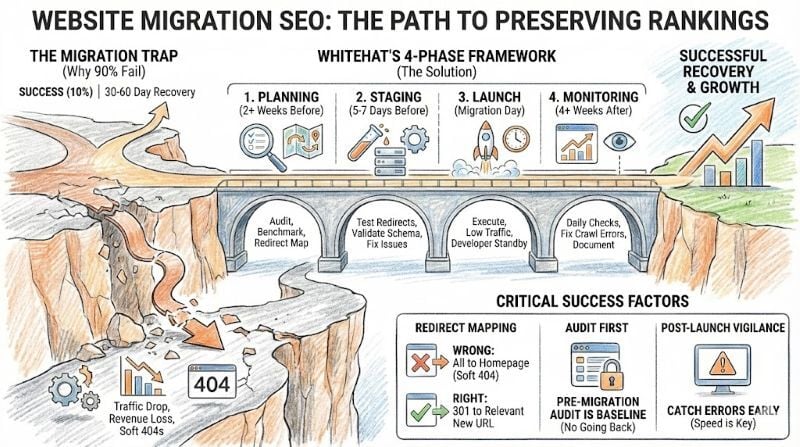
Phase 1 — Planning (2+ weeks before)
Conduct comprehensive audit, benchmark all metrics, build redirect map, assemble cross-functional team (SEO, development, content), create realistic timeline with contingencies.
Phase 2 — Staging (5–7 days before)
Test migration on staging environment, verify all redirects function correctly, validate schema markup, test Core Web Vitals, fix all identified issues before proceeding.
Phase 3 — Launch (migration day)
Execute during lowest traffic period, implement all redirects simultaneously, have developer available for 24–48 hours post-launch, avoid Friday launches at all costs.
Phase 4 — Monitoring (4+ weeks after)
Daily Search Console checks for first two weeks, track performance against benchmarks, address crawl errors immediately, document issues and resolutions for future reference.
Successful migration requires treating SEO as integral, not afterthought
The data tells a clear story: migrations that fail typically do so because SEO considerations were rejected as "too complex" or addressed too late. The £3.8 million revenue loss case study and the 17% of migrations that never recover demonstrate the stakes.
Conversely, migrations that succeed—achieving 5x traffic increases or exceeding pre-migration performance within weeks—follow a consistent pattern: extensive pre-planning, meticulous redirect mapping, staged execution, and aggressive post-launch monitoring.
For businesses planning migrations, the investment in proper SEO migration process pays dividends that extend years beyond the migration itself. Done right, a migration becomes an opportunity to consolidate SEO authority, improve technical foundations, and set the stage for organic growth—rather than a catastrophe requiring months or years of recovery work.
If you're planning a website migration and want expert guidance to protect your organic traffic, our SEO services include comprehensive migration support. We'll handle the technical complexity so you can focus on what the new site will achieve for your business.
Frequently asked questions
How long does it take to recover traffic after a website migration?
Recovery time varies significantly by migration type. HTTP to HTTPS migrations typically recover within 2–4 weeks. CMS platform changes take 4–8 weeks. Domain migrations can take 6–18 months, though well-executed migrations by experienced teams often recover in 30–60 days.
Do 301 redirects pass full link equity?
Yes. Google has confirmed that 301 and 302 redirects don't cause PageRank loss. The persistent myth that redirects lose link equity has been officially debunked. Implement redirects confidently—the key is mapping correctly, not worrying about equity loss.
How long should I keep redirects active after migration?
Google recommends at least 180 days, but industry best practice suggests maintaining redirects for one year or longer. From a user experience perspective, consider keeping redirects indefinitely for high-traffic URLs.
Should I change my domain and redesign my website at the same time?
No. Google explicitly recommends planning changes one after another, not simultaneously. Separating domain changes from redesigns allows you to isolate variables and troubleshoot issues. Combined migrations are the most common cause of catastrophic SEO failures.
What's the biggest mistake businesses make during website migrations?
Redirecting all old URLs to the homepage. Google treats this as a soft-404 and removes those pages from search results entirely. Every old URL must redirect to its most relevant new equivalent—there are no shortcuts.
References & Sources
- Google Search Central: How to Move a Site with URL Changes — Official Google documentation on site migrations
- Search Engine Journal: How Long Should an SEO Migration Take? (2024 Study) — Research on 892 domain migrations
- Google Search Central: Redirects and Google Search — Official guidance on redirect implementation
- Search Engine Land: Site Migration SEO Guide — Comprehensive migration checklist
- Local SEO Guide: Domain Migration Recovery Research — Case studies on 30–60 day recovery timelines
Planning a website migration?
Don't risk your organic traffic. Whitehat's migration framework protects your rankings and sets you up for growth.
Get a Free Migration Assessment